

Quick summary
- A review cycle moves a controlled document from Draft to Approved, and the document is locked from the moment the cycle begins.
- Every person on the Must review and Must approve lists must act before the cycle can proceed, but optional reviewers and approvers do not hold it up.
- E-signatures are available as a separate add-on for organisations working to FDA 21 CFR Part 11.
The review and approval cycle
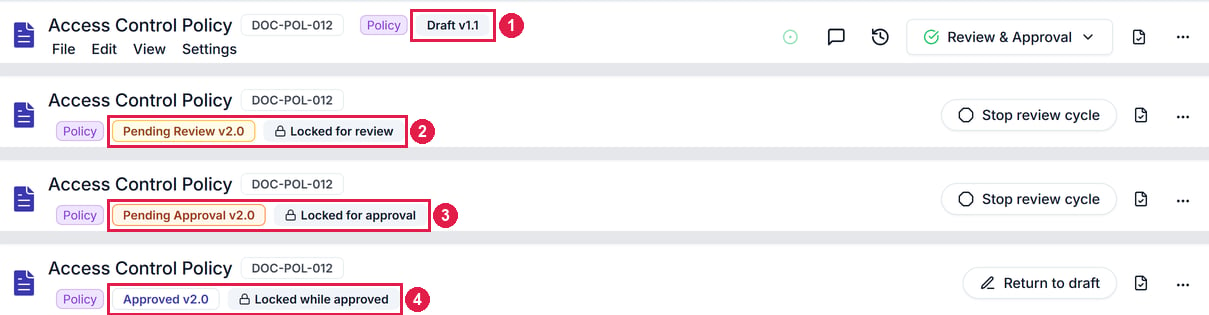
The same document's header through one cycle, with each status and lock label boxed. 1 is Draft v1.1. 2 is Pending Review v2.0, locked for review. 3 is Pending Approval v2.0, locked for approval. 4 is Approved v2.0, locked while approved. The button on the right changes too: Review & Approval, then Stop review cycle, then Return to draft.
Version numbers
- Each approved cycle moves the document to the next major version, like v1.1 to v2.0, or v0.x to v1.0 for the first.
- You can change the suggested number.
Who reviews and approves
A controlled document has 4 lists:
Each list takes people or roles, not groups. Choose a role where you can, so the cycle still reaches the right person when someone leaves. The same person can review and approve.
Review cycle history
After approval, Versions → Review cycles shows who reviewed and approved the latest cycle, and when.E-signatures
E-signatures make each review and approval a signed record, for organisations working to the FDA’s 21 CFR Part 11.- Each action records the person’s unique identifier, the meaning of the action and an exact timestamp.
- Signing asks you to re-authenticate with an additional factor.
- They’re switched on separately, under Settings → Workspace Setup → Documents → E-signatures. Contact support to request access.
Related articles
Controlled documents
Make a document controlled, start a review cycle, and respond to one.
Procedures and records
The procedures your QMS is built on, and the records that prove you follow them.