

Quick summary
- You can create a group under People → Roles & Groups to hand the same work, like a checklist, to several people at once.
- Assuric won’t delete a group that still has members or assigned checklists.
- You pick a document’s Owner, a hazard log control’s Responsibilities and a risk’s Owners from People, rather than typing a name.
Groups versus roles
A document’s Owner, a hazard log control’s Responsibilities and a risk’s Owners are all picked from People, not typed in.
A role can receive checklists too.
Groups you start with
Every workspace starts with Employees and Offboard, which carries the offboarding checklist. A catalogue of ready-made groups sits alongside them.Create a group
1
Open the New Group dialog
Go to People → Roles & Groups, which opens on the Groups tab, and click Add Group.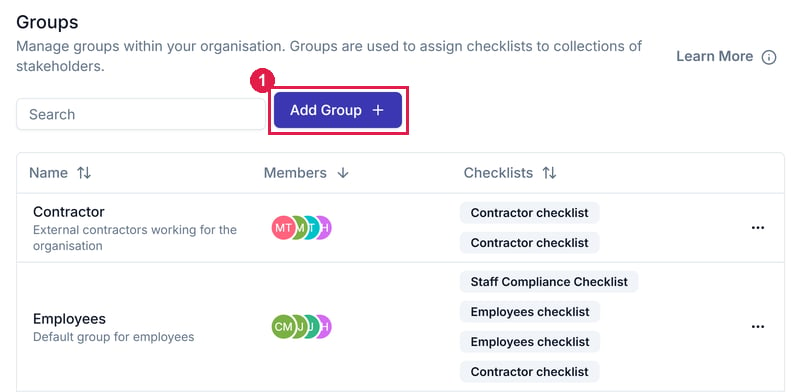
The Groups tab. 1 Add Group creates a group.
2
Name it, add members and save
Enter a Group name and Description. Members are optional and can be added later. Then click Add Group at the bottom of the dialog.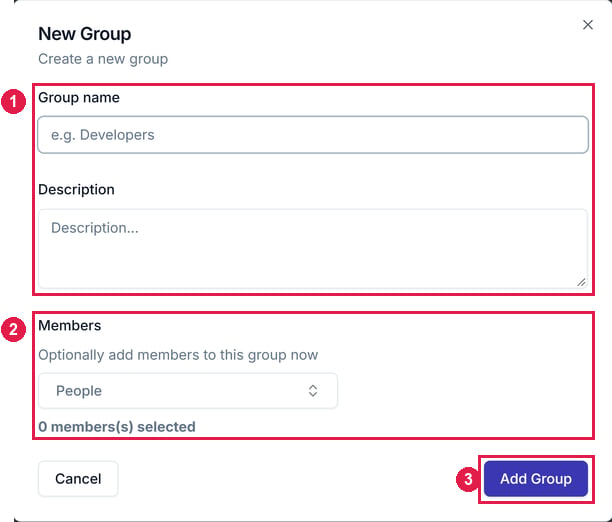
The New Group dialog. 1 Group name and Description. 2 Members, which you can leave until later. 3 Add Group saves it.
Change a group’s members
Open the group, click Edit Members, pick its people and click Confirm. Remove next to a name takes that person out.Edit or delete a group
Open the ⋯ menu on the group’s row. Edit group changes the name and description, and Delete group deletes the group.You can’t delete a group that’s in use
If the group still has members or assigned checklists, Assuric blocks the deletion:This group cannot be deleted while it is still in useExpand the message to see every member (by name) and every checklist blocking it. Remove the members and unassign the checklists first.
Related articles
Inviting people
Adding people to your workspace.
Roles and groups
How roles compare with groups, and key roles.