

Quick summary
- The Assuric document editor lets you write and format documents in blocks, insert placeholders, comment, and edit with others at the same time.
- The editor saves snapshots as you work and you can restore them, but only approved versions count for compliance.
- To share a document, download its approved version from Approved Versions instead of exporting the working copy.
Basic editing and formatting
The editor works in blocks.- Type
/to add a block. - To set apart text a reader mustn’t miss, type
/and choose Callout. To change its colour, click its icon. - Type
@to insert a placeholder, a live value like your company name. - To move a block, drag the handle to its left.
- Format text with the toolbar above the page, and set the block type with Text.
- To switch between Portrait and Landscape, use View → Page layout.
- View → Full screen hides the rest of Assuric. To leave, click the menu button at the top left.
- The mode menu at the top right switches between Editing, Viewing and Suggestion.
Change history
To see the snapshots Assuric keeps as you edit, open View → Version History → Auto-saved.- View on a snapshot shows the document as it was, with its changes highlighted.
- Restore puts the document back to that snapshot.
- The first snapshot is marked (Original).
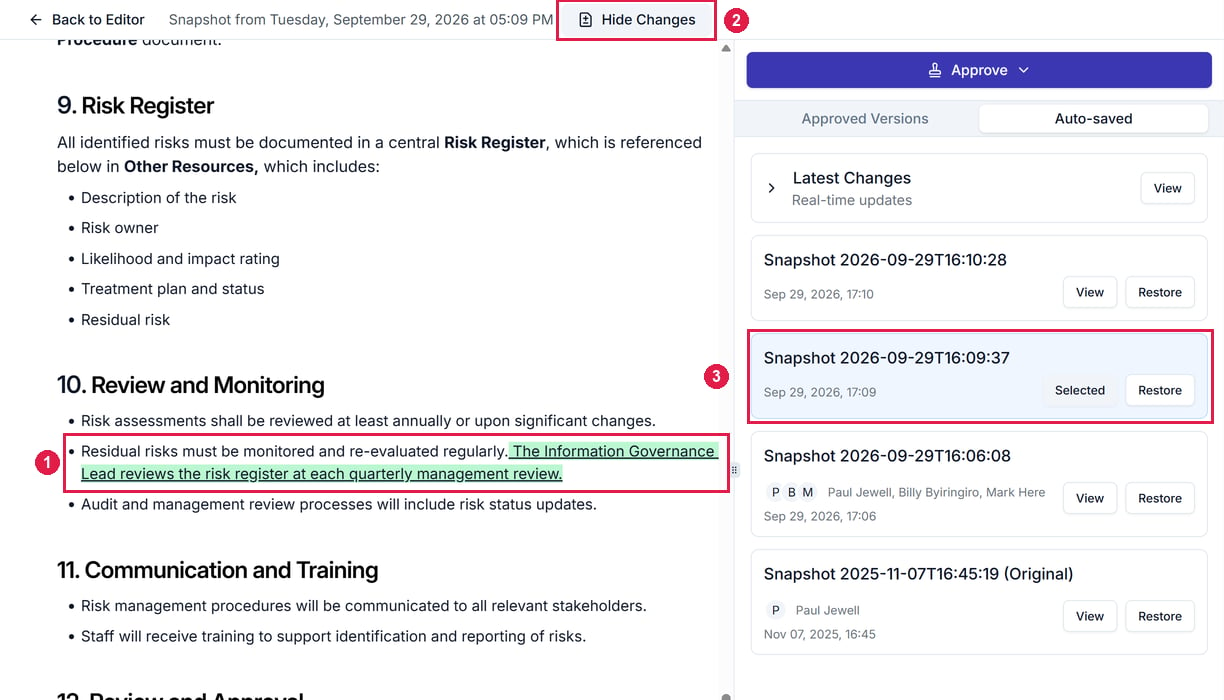
An auto-saved snapshot open from the Auto-saved tab. 1 is the change, highlighted in green. 2 is Hide Changes, which turns the highlighting off. 3 is the snapshot you're viewing, marked Selected.
Comments, live collaboration and autosave
- Comments. Select text and click the comment button in the toolbar that appears. View → Comments shows them all, filtered by open or resolved.
- Live collaboration. Several people can edit at once, seeing each other’s edits as they’re made.
- Autosave. Changes save as you type, so you lose nothing if you close the tab. Its snapshots are under Change history.
Import and export
To share an approved version rather than the working document, download it from Approved Versions.
Related articles
Keep documents current with placeholders
Insert live values, people and tables.
Document versioning
Approve a version and choose where it’s republished.