

Quick summary
- Every task comes with guidance and, usually, a suggested action.
- Find every task on the Tasks page under Compliance, or one framework’s tasks on its Tasks tab.
- One task can satisfy requirements in several frameworks, so completing it once counts everywhere it’s mapped.
Find your tasks
Open Compliance → Tasks for the full list, or a framework’s Tasks tab for just its own. To see only yours, filter by My tasks.What happens when you open a task
A requirement is what a framework asks for, and a task is the work that meets it. Click a task to open its sheet. Read the guidance and take the suggested action (most tasks have one), and the task moves towards Completed.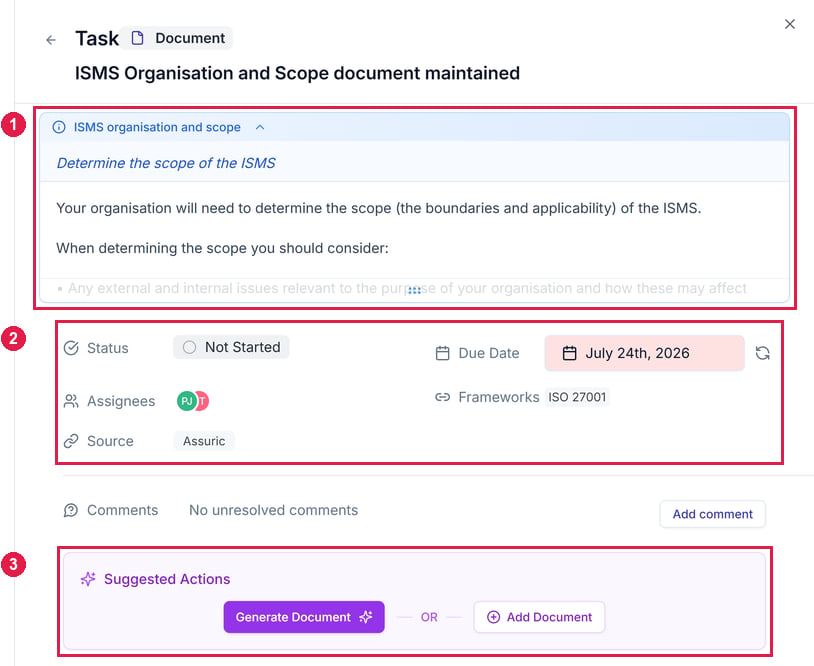
A task sheet. 1 The guidance. 2 Its status, due date and assignees. 3 The suggested action.
What’s in this section
What’s covered elsewhere
Related articles
Frameworks: Overview
What a task satisfies, and how the two are mapped.
Adding a product
How mapping a framework to a product brings in its tasks.