

Quick summary
- Roles and groups decide who receives your checklists and the training attached to them.
- A controlled document’s reviewers and approvers can be named people or roles, but not groups.
- For a key role such as Clinical Safety Officer, you can record the holder’s appointment details as evidence, and every field is optional.
What roles and groups are used for
A role is a formal responsibility, like Clinical Safety Officer. A group is a set of people who get the same work, like your Clinical Safety Team.The standard roles
The Roles tab lists the standard roles. Add Role creates your own.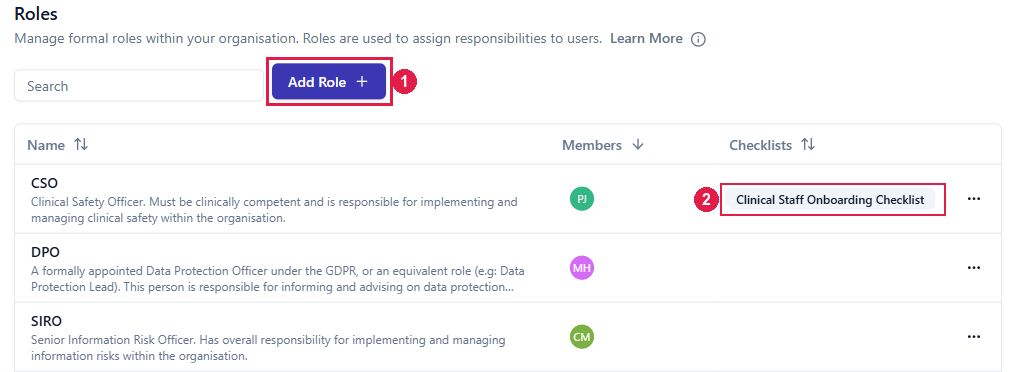
The Roles tab. 1 adds a role of your own. 2 is a checklist assigned to the CSO role.
Key roles
Key roles are the ordinary roles that Company Setup’s Key Roles step asks you to fill, with guidance on each:- DPO, a slot a Data Protection Lead can fill instead
- SIRO, listed in Company Setup as Information Security Lead
- CSO
- HPO (HIPAA Privacy Officer) and HSO (HIPAA Security Officer), if your organisation is a Covered Entity or Business Associate under HIPAA
- Anything you enter is saved as an editable Experience Record in Documents → Evidence & Files.
- Leaving them all blank assigns the role without creating an Experience Record.
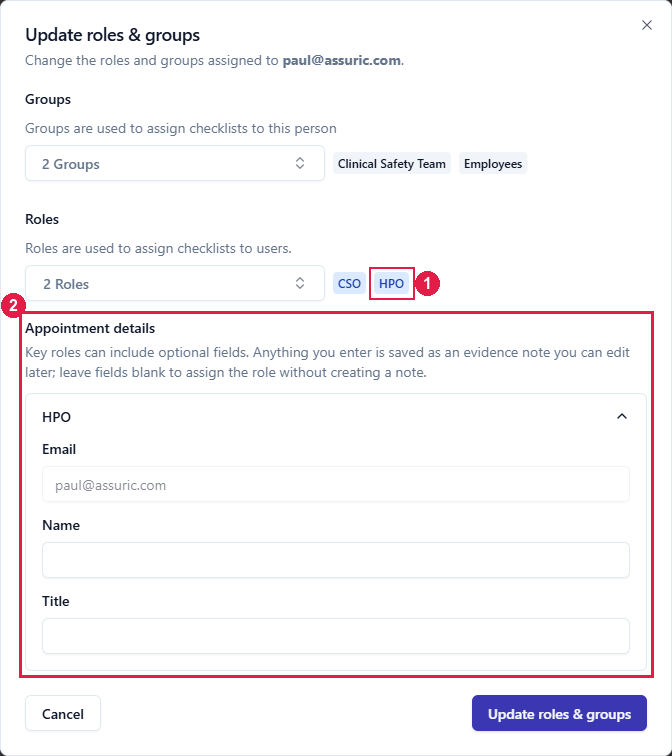
Adding a key role from a person's sheet. 1 is HPO, the key role just added. 2 is Appointment details.
- From the person’s sheet: click the pencil on Roles & Groups, add the role and fill in the appointment details that appear.
- From Company Setup: on the Key Roles step, click Assign new under the role and pick the person. Assuric shows any evidence already recorded for them, so you don’t add a duplicate.
Related articles
Assigning owners and responsibilities
How groups compare with roles, creating groups and adding members.
Permissions and access (authentication and authorisation)
What someone can do in Assuric, which a role doesn’t change.
Evidence and files
Where key-role Experience Records end up.