

Quick summary
- Default placeholders put your company details, people, roles, document details and live tables into a document.
- You can’t edit a default placeholder’s value in the document, because it comes from where that information is kept.
- An approved version keeps the placeholder values from the day it was approved, even though the document keeps updating.
The default placeholders
You don’t edit a default placeholder’s value in the document. It comes from where the information is kept: your company name and logo, for example, come from workspace setup.People and roles
- Person inserts a named person. Click it to set its Color and what follows the name in brackets: Show role, on by default, adds their roles, and Show group adds their groups.
- Role inserts a role, like your Data Protection Officer, and optionally the people assigned to it. Use it to name whoever holds the role, so it stays right when they change.
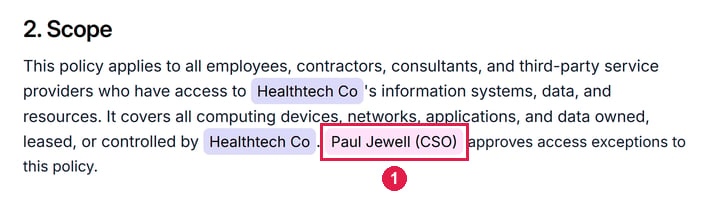
A Person placeholder with Show role on, the default. 1 is the placeholder, which shows the name, Paul Jewell, followed by the role, CSO, in brackets.
Live tables
A live table puts information from Assuric into a document, like a summary of your hazards or the document’s version history, and updates when that information changes, such as when a hazard is added or a version approved. See Configure a live table.Live content and approved versions
Placeholders and live tables keep updating in the editor, but an approved version keeps their values at approval. So a date placeholder in the editor can later differ from the approved date: that’s the working copy, not the record.Related articles
Keep documents current with placeholders
Insert a placeholder, configure a live table, or create your own.
Document versioning
What happens to placeholders when a version is approved.