> ## Documentation Index
> Fetch the complete documentation index at: https://docs.assuric.com/llms.txt
> Use this file to discover all available pages before exploring further.
# Tasks: Overview
> A task is the work that satisfies a framework's requirement. See where to find your tasks, what opening one shows you, and where to go next.
**Quick summary**
* Every task comes with guidance and, usually, a suggested action.
* Find every task on the **Tasks** page under **Compliance**, or one framework's tasks on its **Tasks** tab.
* One task can satisfy requirements in several frameworks, so completing it once counts everywhere it's mapped.
## Find your tasks
Open **Compliance** → **Tasks** for the full list, or a framework's **Tasks** tab for just its own. To see only yours, filter by *My tasks*.
## What happens when you open a task
A requirement is what a framework asks for, and a task is the work that meets it. Click a task to open its sheet. Read the guidance and take the suggested action (most tasks have one), and the task moves towards Completed.
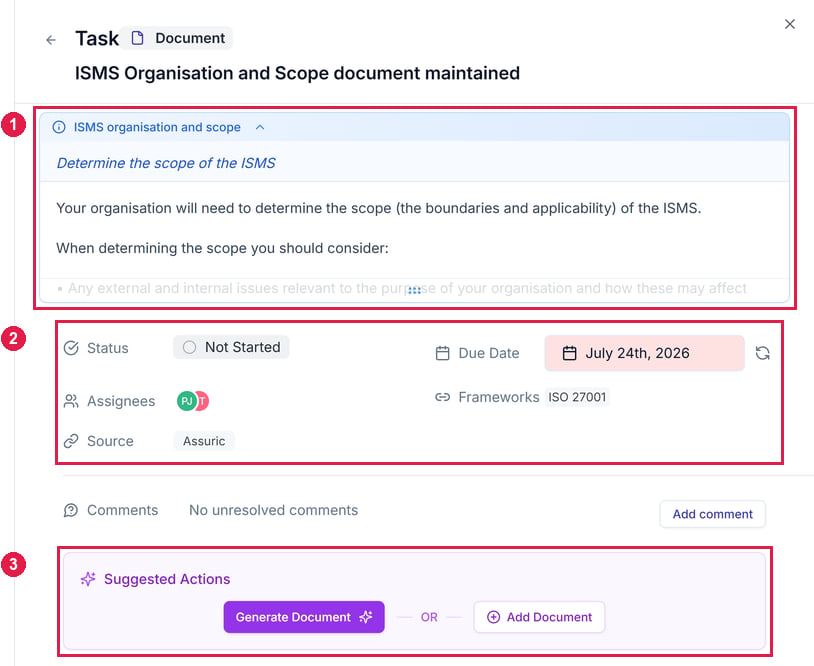 *Mapped Requirements* lists every requirement the task satisfies. Complete the task once and it counts everywhere it's mapped.
## What's in this section
| Page | Covers |
| - | - |
| [Task categories and statuses](/tasks/categories-and-states) | The categories tasks are grouped into, the type each task carries, and what each of the four statuses means |
| [Product-specific tasks](/tasks/product-specific-tasks) | Tasks you complete once per product, adding the ones a product is missing, and what happens when you remove a product |
| [Completing a task](/tasks/completing-a-task) | Reading the guidance, taking the suggested action, and generating documents in bulk |
| [Task management](/tasks/task-management) | Filtering, assigning owners, due dates and recurrence, and commenting |
| [Creating custom tasks](/tasks/creating-custom-tasks) | Adding a task Assuric's defaults don't cover, and mapping it to a requirement |
## What's covered elsewhere
| Covers | Where |
| - | - |
| How a requirement's status is worked out from its tasks | [Framework progress](/frameworks/tracking-and-mapping) |
| Mapping frameworks to a product, which is what brings in its product tasks | [Adding a product](/getting-started/adding-a-product) |
| Getting notified about comments and overdue tasks | [What triggers a notification](/notifications/what-triggers-a-notification) |
## Related articles
What a task satisfies, and how the two are mapped.
How mapping a framework to a product brings in its tasks.
This documentation is built and hosted on [Mintlify](https://mintlify.com), a developer documentation platform.
*Mapped Requirements* lists every requirement the task satisfies. Complete the task once and it counts everywhere it's mapped.
## What's in this section
| Page | Covers |
| - | - |
| [Task categories and statuses](/tasks/categories-and-states) | The categories tasks are grouped into, the type each task carries, and what each of the four statuses means |
| [Product-specific tasks](/tasks/product-specific-tasks) | Tasks you complete once per product, adding the ones a product is missing, and what happens when you remove a product |
| [Completing a task](/tasks/completing-a-task) | Reading the guidance, taking the suggested action, and generating documents in bulk |
| [Task management](/tasks/task-management) | Filtering, assigning owners, due dates and recurrence, and commenting |
| [Creating custom tasks](/tasks/creating-custom-tasks) | Adding a task Assuric's defaults don't cover, and mapping it to a requirement |
## What's covered elsewhere
| Covers | Where |
| - | - |
| How a requirement's status is worked out from its tasks | [Framework progress](/frameworks/tracking-and-mapping) |
| Mapping frameworks to a product, which is what brings in its product tasks | [Adding a product](/getting-started/adding-a-product) |
| Getting notified about comments and overdue tasks | [What triggers a notification](/notifications/what-triggers-a-notification) |
## Related articles
What a task satisfies, and how the two are mapped.
How mapping a framework to a product brings in its tasks.
This documentation is built and hosted on [Mintlify](https://mintlify.com), a developer documentation platform.