> ## Documentation Index
> Fetch the complete documentation index at: https://docs.assuric.com/llms.txt
> Use this file to discover all available pages before exploring further.
# Activity log
> The workspace-wide history of who changed what, and when, filterable by actor, theme and source.
**Quick summary**
* The **Activity** log, under **Workspace** in the sidebar, is your workspace-wide audit trail.
* The log opens on a recent window: **Expand** or search to look further back.
## Where to find it
**Activity** is in the sidebar's **Workspace** group.
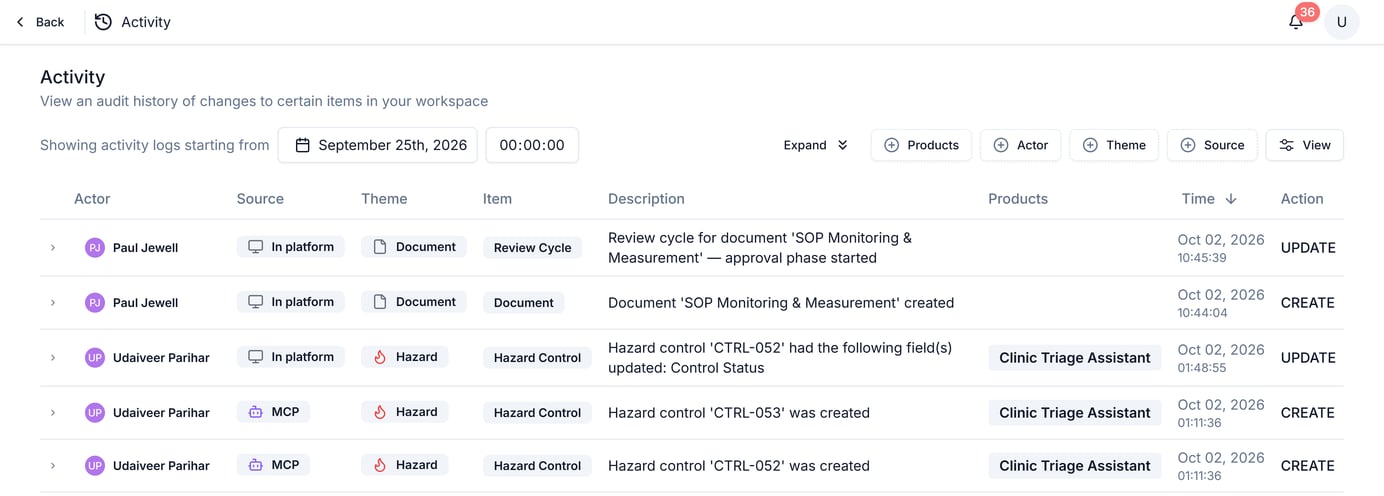 ## What each entry captures
| Column | What it shows |
| - | - |
| *Actor* | Who made the change |
| *Source* | Where the change came from: *In platform*, *Ask Assuric*, *MCP* or *API* |
| *Theme* | The kind of record changed, for example *Document*, *Risk* or *Hazard* |
| *Item* | The specific type of change within that theme, for example *Review Cycle* or *Review Cycle Step* |
| *Description* | A plain-English summary of what happened |
| *Products* | Which product the change relates to, where applicable |
| *Time* | When it happened |
| *Action* | *CREATE*, *UPDATE* and similar |
An *MCP* change comes from an AI assistant connected through the [MCP Server](/integrations/mcp-server) and shows the name of the person who connected it.
## Filter and search
Filter by *Products*, *Actor*, *Theme* or *Source*, and set a *View*. The log defaults to a recent window; use **Expand** to widen the date range. Search reaches beyond 30 days back.
## A narrower view, per document
A single document's own **Activity** tab is this log filtered to that document.
**What we recommend**
When something looks wrong, check the **Activity** log first to see who touched it and when. It's faster than asking around, and an assessor trusts it over a verbal account.
## Related articles
The per-document view of this same log.
The rest of your workspace-wide configuration.
This documentation is built and hosted on [Mintlify](https://mintlify.com), a developer documentation platform.
## What each entry captures
| Column | What it shows |
| - | - |
| *Actor* | Who made the change |
| *Source* | Where the change came from: *In platform*, *Ask Assuric*, *MCP* or *API* |
| *Theme* | The kind of record changed, for example *Document*, *Risk* or *Hazard* |
| *Item* | The specific type of change within that theme, for example *Review Cycle* or *Review Cycle Step* |
| *Description* | A plain-English summary of what happened |
| *Products* | Which product the change relates to, where applicable |
| *Time* | When it happened |
| *Action* | *CREATE*, *UPDATE* and similar |
An *MCP* change comes from an AI assistant connected through the [MCP Server](/integrations/mcp-server) and shows the name of the person who connected it.
## Filter and search
Filter by *Products*, *Actor*, *Theme* or *Source*, and set a *View*. The log defaults to a recent window; use **Expand** to widen the date range. Search reaches beyond 30 days back.
## A narrower view, per document
A single document's own **Activity** tab is this log filtered to that document.
**What we recommend**
When something looks wrong, check the **Activity** log first to see who touched it and when. It's faster than asking around, and an assessor trusts it over a verbal account.
## Related articles
The per-document view of this same log.
The rest of your workspace-wide configuration.
This documentation is built and hosted on [Mintlify](https://mintlify.com), a developer documentation platform.