> ## Documentation Index
> Fetch the complete documentation index at: https://docs.assuric.com/llms.txt
> Use this file to discover all available pages before exploring further.
# Review cycle and statuses
> The statuses a controlled document moves through, how its versions are numbered, the 4 reviewer and approver lists, and e-signatures.
**Quick summary**
* A review cycle moves a controlled document from *Draft* to *Approved*, and the document is locked from the moment the cycle begins.
* Every person on the *Must review* and *Must approve* lists must act before the cycle can proceed, but optional reviewers and approvers do not hold it up.
* E-signatures are available as a separate add-on for organisations working to FDA 21 CFR Part 11.
## The review and approval cycle
```mermaid theme={null}
%%{init: {"flowchart": {"curve": "basis", "nodeSpacing": 60, "rankSpacing": 60, "padding": 16}}}%%
flowchart TD
A(["Draft · v1.1"]):::draft
B(["Pending Review · v2.0"]):::pending
C(["Pending Approval · v2.0"]):::pending
D(["Approved · v2.0
Locked while approved"]):::approved
E(["Draft · v2.1
Ready for the next cycle"]):::draft
X{{"Changes requested
Stays pending"}}:::changes
A -->|"Send for review
and approval"| B
B -->|"All required reviewers
complete review"| C
C -->|"All required
approvers approve"| D
D -->|"Return to draft"| E
B -.->|"Request changes"| X
C -.->|"Request changes"| X
X -.->|"Stop review cycle"| A
classDef draft fill:#EEEDFB,stroke:#8A87DE,stroke-width:2px,color:#1702A2
classDef pending fill:#FFF4D6,stroke:#E0A100,stroke-width:2px,color:#5C3F00
classDef approved fill:#E2F5E9,stroke:#2E9E5B,stroke-width:2px,color:#0F4F2A
classDef changes fill:#FDECEC,stroke:#D9534F,stroke-width:2px,color:#7A1A17
linkStyle 0,1,2,3 stroke:#8A87DE,stroke-width:2px
linkStyle 4,5,6 stroke:#D9534F,stroke-width:2px
```
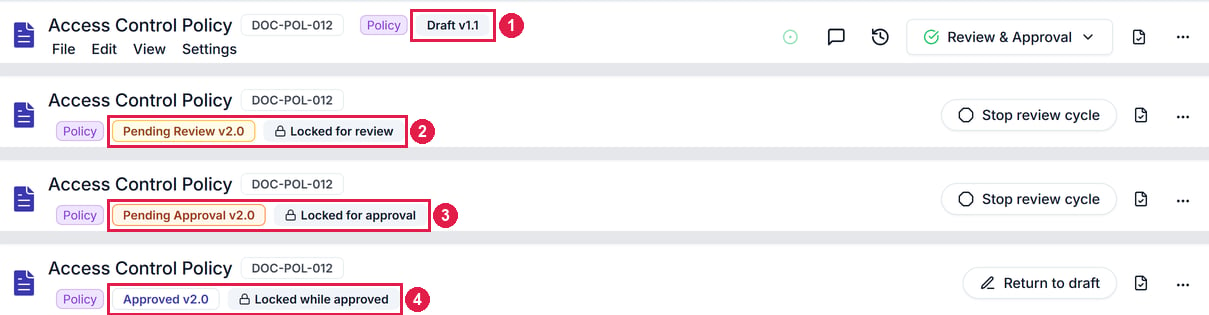
| Status | What it means | Who acts | Can it be edited? |
| - | - | - | - |
| *Draft* | The working draft, numbered as the next minor version | The document's editors | Yes |
| *Pending Review* | Sent for review, as the proposed version | Reviewers | No: "Locked for review" |
| *Pending Approval* | Every required reviewer has completed their review | Approvers | No: "Locked for approval" |
| *Approved* | Every required approver has approved. This is the version in use | Nobody, until someone clicks **Return to draft** | No: "Locked while approved" |
 ## Version numbers
* Each approved cycle moves the document to the next major version, like v1.1 to v2.0, or v0.x to v1.0 for the first.
* You can change the suggested number.
## Who reviews and approves
A controlled document has 4 lists:
| List | Effect |
| - | - |
| *Must review* | Everyone listed must complete their review before the document moves to approval |
| *Optional reviewers* | Can review, but don't hold the cycle up |
| *Must approve* | Everyone listed must approve before the version is approved |
| *Optional approvers* | Can approve, but don't hold the cycle up |
Each list takes people or roles, not groups. Choose a [role](/people/roles-and-groups) where you can, so the cycle still reaches the right person when someone leaves. The same person can review and approve.
## Review cycle history
After approval, **Versions** → **Review cycles** shows who reviewed and approved the latest cycle, and when.
## E-signatures
E-signatures make each review and approval a signed record, for organisations working to the FDA's 21 CFR Part 11.
* Each action records the person's unique identifier, the meaning of the action and an exact timestamp.
* Signing asks you to re-authenticate with an additional factor.
* They're switched on separately, under **Settings** → **Workspace Setup** → **Documents** → **E-signatures**. Contact support to request access.
## Related articles
Make a document controlled, start a review cycle, and respond to one.
The procedures your QMS is built on, and the records that prove you follow them.
This documentation is built and hosted on [Mintlify](https://mintlify.com), a developer documentation platform.
## Version numbers
* Each approved cycle moves the document to the next major version, like v1.1 to v2.0, or v0.x to v1.0 for the first.
* You can change the suggested number.
## Who reviews and approves
A controlled document has 4 lists:
| List | Effect |
| - | - |
| *Must review* | Everyone listed must complete their review before the document moves to approval |
| *Optional reviewers* | Can review, but don't hold the cycle up |
| *Must approve* | Everyone listed must approve before the version is approved |
| *Optional approvers* | Can approve, but don't hold the cycle up |
Each list takes people or roles, not groups. Choose a [role](/people/roles-and-groups) where you can, so the cycle still reaches the right person when someone leaves. The same person can review and approve.
## Review cycle history
After approval, **Versions** → **Review cycles** shows who reviewed and approved the latest cycle, and when.
## E-signatures
E-signatures make each review and approval a signed record, for organisations working to the FDA's 21 CFR Part 11.
* Each action records the person's unique identifier, the meaning of the action and an exact timestamp.
* Signing asks you to re-authenticate with an additional factor.
* They're switched on separately, under **Settings** → **Workspace Setup** → **Documents** → **E-signatures**. Contact support to request access.
## Related articles
Make a document controlled, start a review cycle, and respond to one.
The procedures your QMS is built on, and the records that prove you follow them.
This documentation is built and hosted on [Mintlify](https://mintlify.com), a developer documentation platform.