> ## Documentation Index
> Fetch the complete documentation index at: https://docs.assuric.com/llms.txt
> Use this file to discover all available pages before exploring further.
# Procedures and records
> How a procedure is a document behind a policy task, where controlled documents fit, and the records that prove you follow your procedures.
**Quick summary**
* A procedure is the real document behind a policy task, and a record is the proof you followed it.
* Approving a procedure's document updates the task's status.
* You send an approved procedure to staff yourself, by adding it to a checklist or the staff portal.
## Procedures are documents
A procedure task is a policy task: a *Document* task in the *Policies* group, like *Quality Manual & Policy maintained*. It names the document that answers it, a standard operating procedure (SOP) when the requirement is for a written procedure.
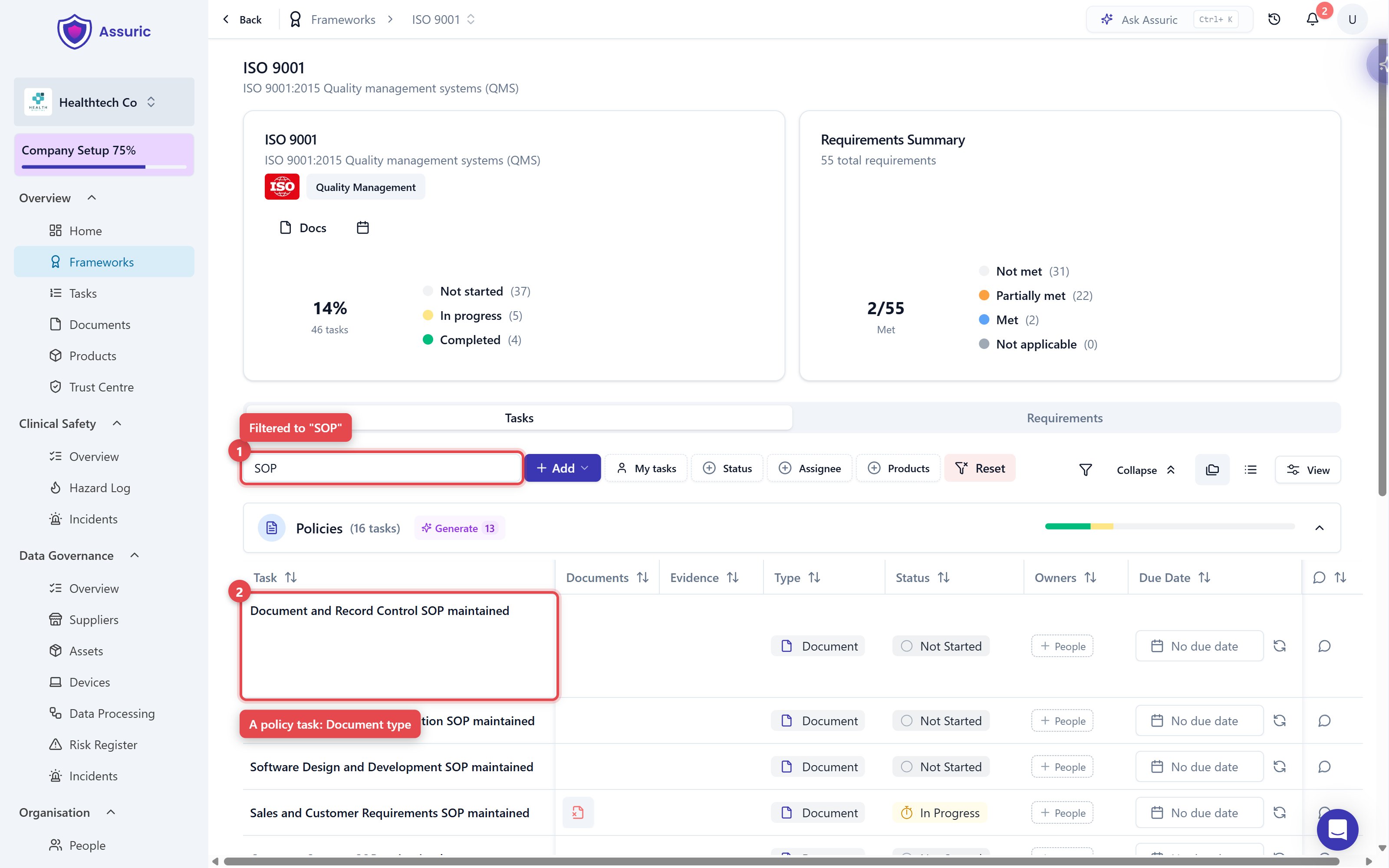 *Filtering a task list to "SOP" (1) narrows it to policy tasks, one written procedure each (2).*
That document is [versioned](/documents/versions-and-version-history) and approved like any other, so approving it updates the task's status.
## Controlled documents
Tick **Controlled** on the procedures your quality management system (QMS) is built on. They get a Document ID and a formal review and approval cycle, and are locked while the cycle runs and once approved.
## Give staff the procedures to read
Staff only get procedures you send. Once it's approved, add the document to either of these:
* **A checklist:** Add it as a [*Resources* item](/people/checklists#resources-items-signing-off-a-policy). Staff open the document and click **I have read and understood the above resources**, and each person's **History** keeps the version and date they confirmed, which you show an auditor.
* **The staff portal:** Add it to the **Resources** tab of your [staff portal](/people/staff-portal), assigned to the groups who need it.
When you approve a new version, [Republish options](/documents/versions-and-version-history#republish-options) lets you move each checklist item and staff portal resource using the document to the new version.
## Records
Record tasks ask for dated proof, not a document. Each has an owner from People, and most sit in the *Organisation* group, shared between ISO 9001 and ISO 13485.
*Filtering a task list to "SOP" (1) narrows it to policy tasks, one written procedure each (2).*
That document is [versioned](/documents/versions-and-version-history) and approved like any other, so approving it updates the task's status.
## Controlled documents
Tick **Controlled** on the procedures your quality management system (QMS) is built on. They get a Document ID and a formal review and approval cycle, and are locked while the cycle runs and once approved.
## Give staff the procedures to read
Staff only get procedures you send. Once it's approved, add the document to either of these:
* **A checklist:** Add it as a [*Resources* item](/people/checklists#resources-items-signing-off-a-policy). Staff open the document and click **I have read and understood the above resources**, and each person's **History** keeps the version and date they confirmed, which you show an auditor.
* **The staff portal:** Add it to the **Resources** tab of your [staff portal](/people/staff-portal), assigned to the groups who need it.
When you approve a new version, [Republish options](/documents/versions-and-version-history#republish-options) lets you move each checklist item and staff portal resource using the document to the new version.
## Records
Record tasks ask for dated proof, not a document. Each has an owner from People, and most sit in the *Organisation* group, shared between ISO 9001 and ISO 13485.
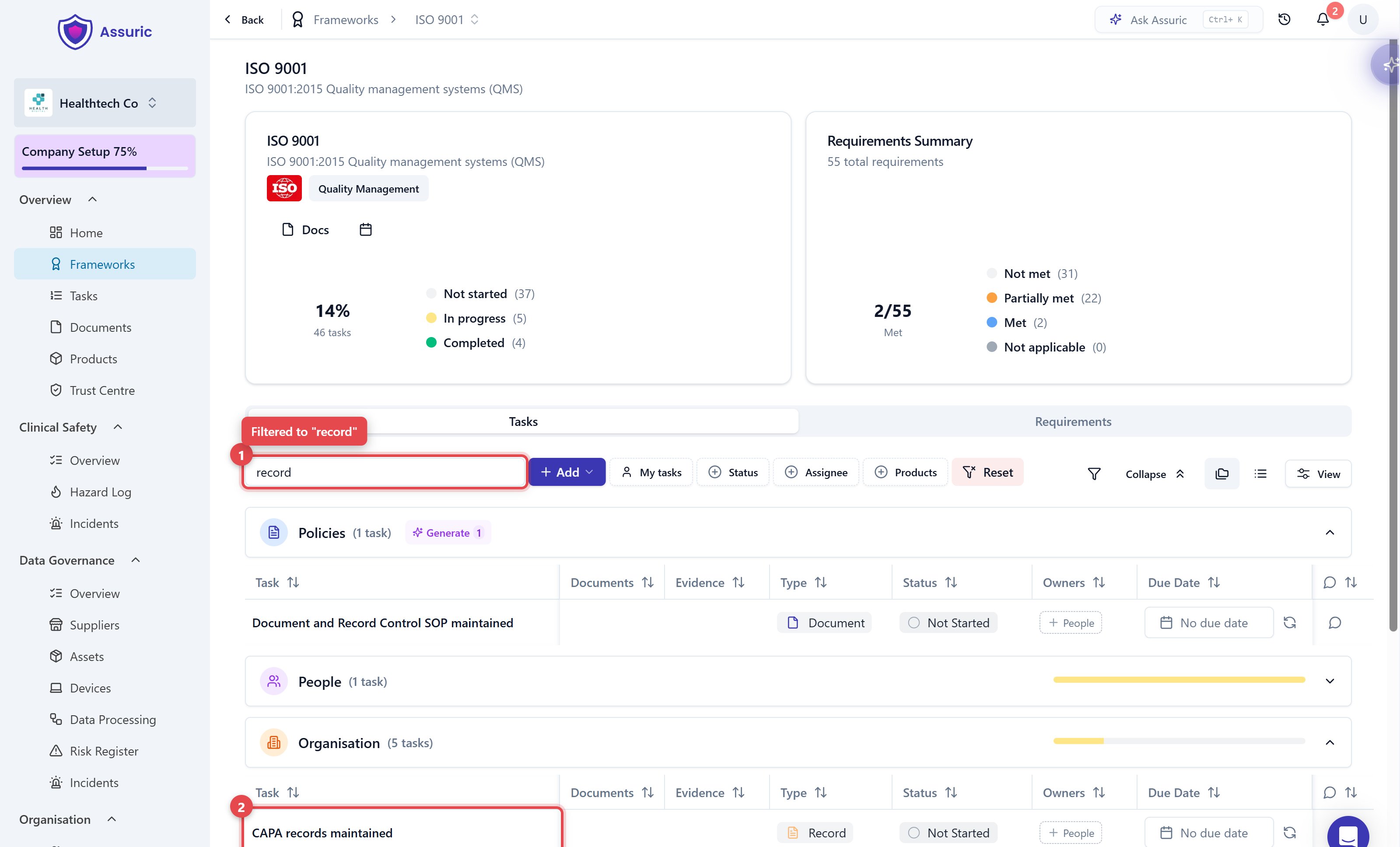 *Filtering to "record" (1) surfaces the operational records, like CAPA records maintained (2), rather than the policies behind them.*
## Related articles
The review and approval cycle for your procedures.
Have staff read and sign off a procedure, and keep the proof.
Where your procedures and records get examined.
Quick answers to the things customers ask us most.
This documentation is built and hosted on [Mintlify](https://mintlify.com), a developer documentation platform.
*Filtering to "record" (1) surfaces the operational records, like CAPA records maintained (2), rather than the policies behind them.*
## Related articles
The review and approval cycle for your procedures.
Have staff read and sign off a procedure, and keep the proof.
Where your procedures and records get examined.
Quick answers to the things customers ask us most.
This documentation is built and hosted on [Mintlify](https://mintlify.com), a developer documentation platform.