> ## Documentation Index
> Fetch the complete documentation index at: https://docs.assuric.com/llms.txt
> Use this file to discover all available pages before exploring further.
# Manage your incident log
> Filter your incident log, track statuses and link incidents to the hazards and risks they relate to.
**Quick summary**
* The incident log holds every incident, whether you added it, imported it or someone reported it.
* You can customise your incident statuses, severity levels and causes, and reorder the statuses.
* **Archive** hides an incident and you can unarchive it. **Remove** deletes it for good.
Open the log from **Privacy & Security → Incidents**.
## Read the log
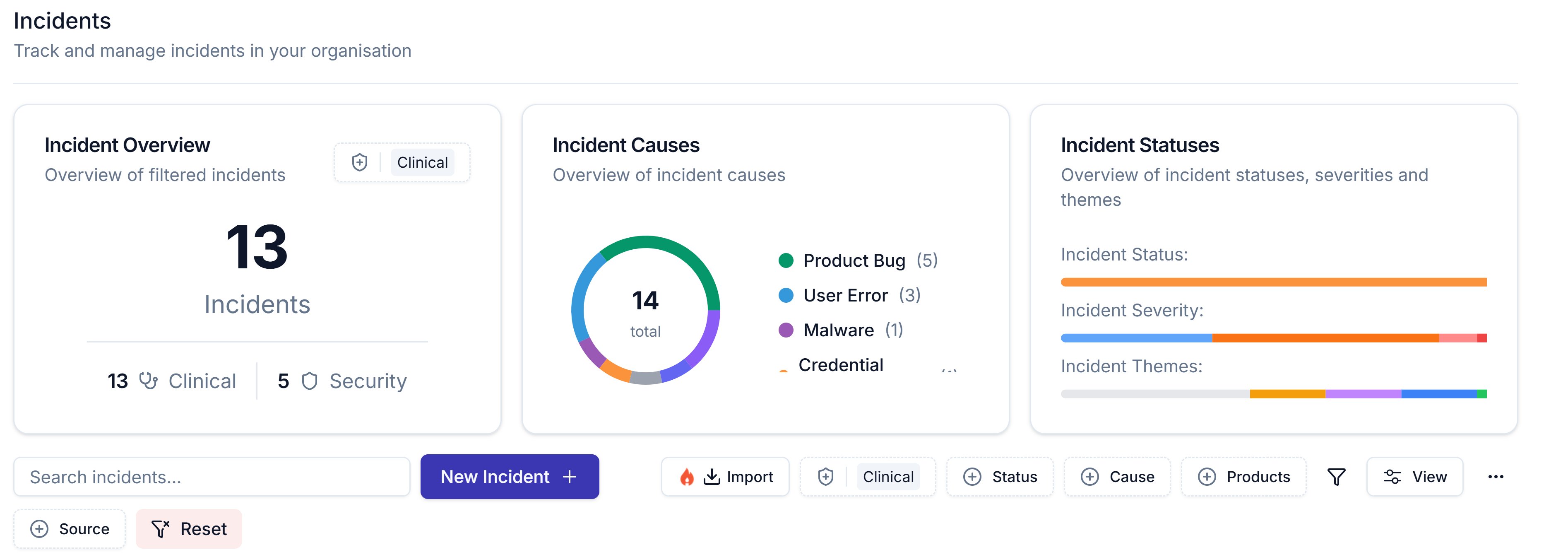 The tiles update as you filter:
* **Incident Overview:** the total for the category you pick.
* **Incident Causes:** a chart of your causes.
* **Incident Statuses:** bars for *Incident Status*, *Incident Severity* and *Incident Themes*.
## Filter and arrange the log
| Control | What it does |
| - | - |
| **Search incidents...** | Searches the list, and the *Status*, *Cause* and *Products* filters narrow it too |
| **Import** | Appears only once incident.io is connected |
| **Category** | Shows *Clinical*, *Security* or both |
| **Source** | Shows how an incident arrived: *Assuric*, *Incident.io*, *Upload*, *Staff Report* or *Trust Page Report* |
| **The funnel** | Adds more filters, such as *Archived*, *Severity*, *Theme* and *Owners* |
| **View** | Chooses which columns show and reorders them, and *Incident ID* and *Title* always stay |
To import from incident.io, see [Import incidents from incident.io](/privacy-security/importing-incidents).
## Statuses
Each incident has a *Status*, such as *Investigating* or *Closed*. To add your own statuses, severity levels or causes, click **Create New** in the *Status*, *Severity* or *Cause(s)* field, and drag statuses to reorder them. An imported incident also shows its incident.io status.
When you close an incident, record the *Date Closed* in **Incident Information**.
## Link an incident to hazards and risks
With *Security* selected, the *Mapped Risks* column shows each incident's linked risks. To edit links, see [Create an incident](/privacy-security/incidents#link-the-incident).
## Investigate and learn
These fields in **Investigation & Response** feed the log:
* *Incident Themes*: tag incidents to spot trends. The **Incident Statuses** tile and *Theme* filter both use these tags.
* *Associated Evidence*: use **Add Evidence** to pick from your library, or add a **File** ([Evidence and files](/documents/evidence)).
The other fields are in [Complete the record](/privacy-security/incidents#complete-the-record).
## Edit, archive or remove an incident
Click **...** at the end of a row for **Edit**, **Archive** or **Remove**.
* **Archive** hides the incident from the list and tiles at once, with no confirmation.
* **Remove** asks "Are you absolutely sure?", then **Remove Incident** deletes it for good.
To unarchive an incident:
1. Click the funnel and set *Archived* to *Yes*, so the list and tiles show only archived incidents.
2. Click **...** on the incident, then **Unarchive**.
3. Set *Archived* back to *No*.
Review the log on a schedule: give every open incident an owner, fill in *Outcomes* and *Lessons Learned* before closing one, and link each to a hazard or risk.
## Related articles
Take your incident log out of Assuric.
The security risks your incidents link to.
This documentation is built and hosted on [Mintlify](https://mintlify.com), a developer documentation platform.
The tiles update as you filter:
* **Incident Overview:** the total for the category you pick.
* **Incident Causes:** a chart of your causes.
* **Incident Statuses:** bars for *Incident Status*, *Incident Severity* and *Incident Themes*.
## Filter and arrange the log
| Control | What it does |
| - | - |
| **Search incidents...** | Searches the list, and the *Status*, *Cause* and *Products* filters narrow it too |
| **Import** | Appears only once incident.io is connected |
| **Category** | Shows *Clinical*, *Security* or both |
| **Source** | Shows how an incident arrived: *Assuric*, *Incident.io*, *Upload*, *Staff Report* or *Trust Page Report* |
| **The funnel** | Adds more filters, such as *Archived*, *Severity*, *Theme* and *Owners* |
| **View** | Chooses which columns show and reorders them, and *Incident ID* and *Title* always stay |
To import from incident.io, see [Import incidents from incident.io](/privacy-security/importing-incidents).
## Statuses
Each incident has a *Status*, such as *Investigating* or *Closed*. To add your own statuses, severity levels or causes, click **Create New** in the *Status*, *Severity* or *Cause(s)* field, and drag statuses to reorder them. An imported incident also shows its incident.io status.
When you close an incident, record the *Date Closed* in **Incident Information**.
## Link an incident to hazards and risks
With *Security* selected, the *Mapped Risks* column shows each incident's linked risks. To edit links, see [Create an incident](/privacy-security/incidents#link-the-incident).
## Investigate and learn
These fields in **Investigation & Response** feed the log:
* *Incident Themes*: tag incidents to spot trends. The **Incident Statuses** tile and *Theme* filter both use these tags.
* *Associated Evidence*: use **Add Evidence** to pick from your library, or add a **File** ([Evidence and files](/documents/evidence)).
The other fields are in [Complete the record](/privacy-security/incidents#complete-the-record).
## Edit, archive or remove an incident
Click **...** at the end of a row for **Edit**, **Archive** or **Remove**.
* **Archive** hides the incident from the list and tiles at once, with no confirmation.
* **Remove** asks "Are you absolutely sure?", then **Remove Incident** deletes it for good.
To unarchive an incident:
1. Click the funnel and set *Archived* to *Yes*, so the list and tiles show only archived incidents.
2. Click **...** on the incident, then **Unarchive**.
3. Set *Archived* back to *No*.
Review the log on a schedule: give every open incident an owner, fill in *Outcomes* and *Lessons Learned* before closing one, and link each to a hazard or risk.
## Related articles
Take your incident log out of Assuric.
The security risks your incidents link to.
This documentation is built and hosted on [Mintlify](https://mintlify.com), a developer documentation platform.