> ## Documentation Index
> Fetch the complete documentation index at: https://docs.assuric.com/llms.txt
> Use this file to discover all available pages before exploring further.
# Roles and groups
> Roles name formal responsibilities and groups gather people. Both decide who gets checklists and training. Roles can also review and approve controlled documents, and key roles record appointment evidence.
**Quick summary**
* Roles and groups decide who receives your checklists and the training attached to them.
* A controlled document's reviewers and approvers can be named people or roles, but not groups.
* For a key role such as Clinical Safety Officer, you can record the holder's appointment details as evidence, and every field is optional.
Find both under **People** → **Roles & Groups**, on the **Groups** and **Roles** tabs. To add either to a person, use **Roles & Groups** on their sheet.
## What roles and groups are used for
A role is a formal responsibility, like Clinical Safety Officer. A group is a set of people who get the same work, like your Clinical Safety Team.
| Assignment | How roles and groups come in |
| - | - |
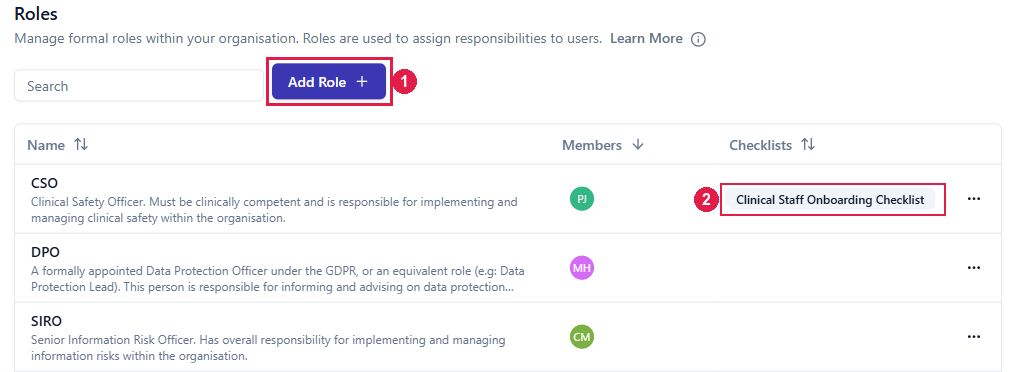
| **Checklists** | A checklist goes to the groups and roles picked under **Assigned Groups / Roles**, and the Roles tab's **Checklists** column shows what each role receives |
| **Training** | [Training](/people/training) reaches people as a checklist item, so it goes to the same groups and roles as its checklist |
| **Reviewing and approving controlled documents** | A controlled document's [reviewer and approver lists](/quality/review-cycle-and-statuses#who-reviews-and-approves) accept named people or roles but not groups |
## The standard roles
The **Roles** tab lists the standard roles. **Add Role** creates your own.
 ## Key roles
Key roles are the ordinary roles that Company Setup's **Key Roles** step asks you to fill, with guidance on each:
* **DPO**, a slot a Data Protection Lead can fill instead
* **SIRO**, listed in Company Setup as Information Security Lead
* **CSO**
* **HPO** (HIPAA Privacy Officer) and **HSO** (HIPAA Security Officer), if your organisation is a Covered Entity or Business Associate under HIPAA
For a key role, Assuric also asks for the holder's *Appointment details*, the evidence of their competence. The fields vary by role, and every one is optional:
* Anything you enter is saved as an editable *Experience Record* in **Documents** → **Evidence & Files**.
* Leaving them all blank assigns the role without creating an *Experience Record*.
## Key roles
Key roles are the ordinary roles that Company Setup's **Key Roles** step asks you to fill, with guidance on each:
* **DPO**, a slot a Data Protection Lead can fill instead
* **SIRO**, listed in Company Setup as Information Security Lead
* **CSO**
* **HPO** (HIPAA Privacy Officer) and **HSO** (HIPAA Security Officer), if your organisation is a Covered Entity or Business Associate under HIPAA
For a key role, Assuric also asks for the holder's *Appointment details*, the evidence of their competence. The fields vary by role, and every one is optional:
* Anything you enter is saved as an editable *Experience Record* in **Documents** → **Evidence & Files**.
* Leaving them all blank assigns the role without creating an *Experience Record*.
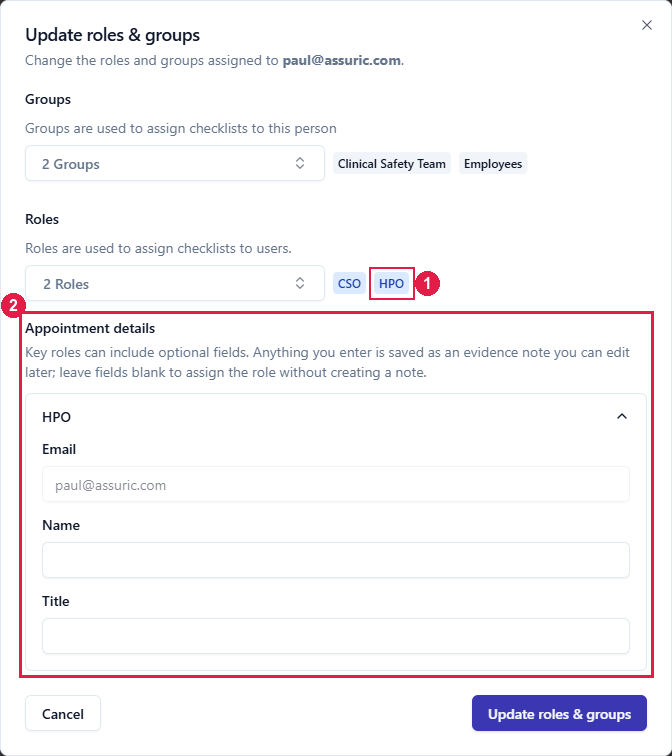 You can assign a key role in 2 places:
* **From the person's sheet:** click the pencil on **Roles & Groups**, add the role and fill in the appointment details that appear.
* **From Company Setup:** on the **Key Roles** step, click **Assign new** under the role and pick the person. Assuric shows any evidence already recorded for them, so you don't add a duplicate.
A key role can have more than one holder, each with their own appointment details.
**What we recommend**
Give roles only for genuine responsibilities, since most people get their work through groups. Assign that work to the role, not the person, so when your Quality Manager leaves, you reassign one role and every checklist and document approval follows.
## Related articles
How groups compare with roles, creating groups and adding members.
What someone can do in Assuric, which a role doesn't change.
Where key-role Experience Records end up.
This documentation is built and hosted on [Mintlify](https://mintlify.com), a developer documentation platform.
You can assign a key role in 2 places:
* **From the person's sheet:** click the pencil on **Roles & Groups**, add the role and fill in the appointment details that appear.
* **From Company Setup:** on the **Key Roles** step, click **Assign new** under the role and pick the person. Assuric shows any evidence already recorded for them, so you don't add a duplicate.
A key role can have more than one holder, each with their own appointment details.
**What we recommend**
Give roles only for genuine responsibilities, since most people get their work through groups. Assign that work to the role, not the person, so when your Quality Manager leaves, you reassign one role and every checklist and document approval follows.
## Related articles
How groups compare with roles, creating groups and adding members.
What someone can do in Assuric, which a role doesn't change.
Where key-role Experience Records end up.
This documentation is built and hosted on [Mintlify](https://mintlify.com), a developer documentation platform.