> ## Documentation Index
> Fetch the complete documentation index at: https://docs.assuric.com/llms.txt
> Use this file to discover all available pages before exploring further.
# Default placeholders
> The placeholders that come with Assuric, how person and role placeholders follow the people behind them, what live tables show, and which values an approved version keeps.
**Quick summary**
* Default placeholders put your company details, people, roles, document details and live tables into a document.
* You can't edit a default placeholder's value in the document, because it comes from where that information is kept.
* An approved version keeps the placeholder values from the day it was approved, even though the document keeps updating.
## The default placeholders
You don't edit a default placeholder's value in the document. It comes from where the information is kept: your company name and logo, for example, come from workspace setup.
| Group | Placeholders |
| - | - |
| **Your company** | Company Name, Company Legal Name, Company Address, Company Logo, Company Privacy Email |
| **People** | Person, Role |
| **This document** | Document Title, Document Type, Document Tags, Document Owner(s), Document ID (Controlled), Document Version Number, Document Status, Document Recurrence, Document Review Due Date, Document Reviewers, Document Approvers, Document Scoped Product(s) |
| **Links and dates** | Document (another document), Evidence (an evidence item), Current Date |
| **Live tables** | Document Version History, Document Approval Table, Hazard Log Summary, Hazard Risk Summary Table |
## People and roles
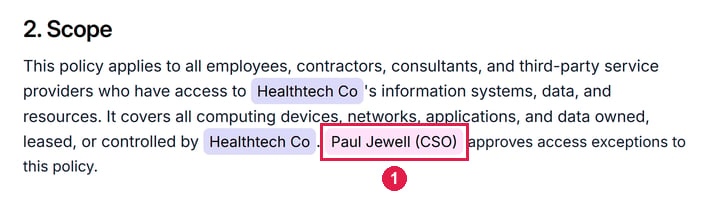
* *Person* inserts a named person. Click it to set its *Color* and what follows the name in brackets: *Show role*, on by default, adds their roles, and *Show group* adds their groups.
* *Role* inserts a role, like your Data Protection Officer, and optionally the people assigned to it. Use it to name whoever holds the role, so it stays right when they change.
 ## Live tables
A live table puts information from Assuric into a document, like a summary of your hazards or the document's version history, and updates when that information changes, such as when a hazard is added or a version approved. See [Configure a live table](/documents/placeholders#configure-a-live-table).
## Live content and approved versions
Placeholders and live tables keep updating in the editor, but an approved version keeps their values at approval. So a date placeholder in the editor can later differ from the approved date: that's the working copy, not the record.
## Related articles
Insert a placeholder, configure a live table, or create your own.
What happens to placeholders when a version is approved.
This documentation is built and hosted on [Mintlify](https://mintlify.com), a developer documentation platform.
## Live tables
A live table puts information from Assuric into a document, like a summary of your hazards or the document's version history, and updates when that information changes, such as when a hazard is added or a version approved. See [Configure a live table](/documents/placeholders#configure-a-live-table).
## Live content and approved versions
Placeholders and live tables keep updating in the editor, but an approved version keeps their values at approval. So a date placeholder in the editor can later differ from the approved date: that's the working copy, not the record.
## Related articles
Insert a placeholder, configure a live table, or create your own.
What happens to placeholders when a version is approved.
This documentation is built and hosted on [Mintlify](https://mintlify.com), a developer documentation platform.