> ## Documentation Index
> Fetch the complete documentation index at: https://docs.assuric.com/llms.txt
> Use this file to discover all available pages before exploring further.
# Approve and version your hazard log
> Save an approved version of a product's hazard log, update the places it is already published, and find, download or remove past versions.
**Quick summary**
* Each approval saves a new version of one product's hazard log, so you approve each product separately.
* *Republish options* is ticked by default, so approving also updates the published hazard logs that already include this product.
* You publish a new bundle separately, from [Share and publish your hazard log](/clinical-safety/sharing-and-publishing).
A version is a saved, approved copy of one product's hazard log. Versions are what you publish to your Trust Centre and send to customers. [Documents](/clinical-safety/managing-clinical-documents) have their own approval cycle.
## Approve a new version
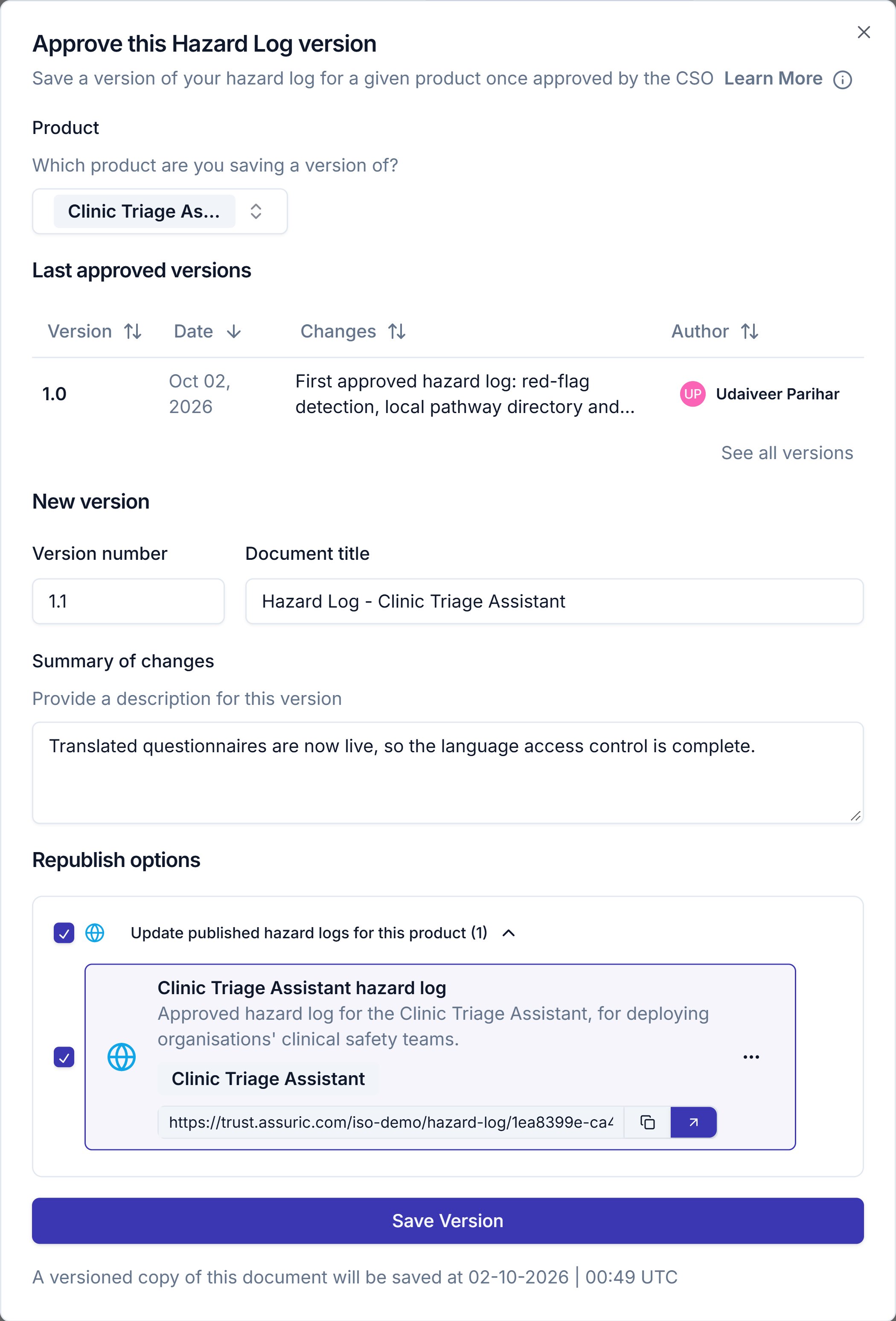
On the **Hazard Log** page, click **Approve**, pick the product under *Product*, then check these under *New version*:
| Field | What it does |
| - | - |
| **Version number** | Assuric suggests the last version plus 0.1, or 1.0 for a first version, and shows "Version number already taken for this product" if the number is used |
| **Document title** | Defaults to "Hazard Log - " followed by the product name, which is the title customers see on a published log |
| **Summary of changes** | A reviewer reads this first |
Under *Republish options*, *Update published hazard logs for this product* is ticked by default.
* Expand the option to untick any published hazard log you don't want to move to this version.
* If no published hazard log includes the product yet, the dialog has no *Republish options*.
Click **Save Version**. The published hazard logs you left ticked move to the new version.
 **What we recommend**
Write the summary of changes for someone who wasn't in the room: "Updates" won't help them in a year.
### What republishing does
* If you untick *Republish options*, customers keep seeing the version they had.
* The other products in each published log keep their versions.
* The public link stays the same, so customers who saved it see the new version next time they open it.
To change which versions a published log holds, [update the published log](/clinical-safety/sharing-and-publishing#publish-a-hazard-log).
## Find and manage versions
Click **Versions** on the **Hazard Log** page to open the **Hazard Log Versions** sheet. **Save Approved Version** opens the approve dialog from here.
**What we recommend**
Write the summary of changes for someone who wasn't in the room: "Updates" won't help them in a year.
### What republishing does
* If you untick *Republish options*, customers keep seeing the version they had.
* The other products in each published log keep their versions.
* The public link stays the same, so customers who saved it see the new version next time they open it.
To change which versions a published log holds, [update the published log](/clinical-safety/sharing-and-publishing#publish-a-hazard-log).
## Find and manage versions
Click **Versions** on the **Hazard Log** page to open the **Hazard Log Versions** sheet. **Save Approved Version** opens the approve dialog from here.
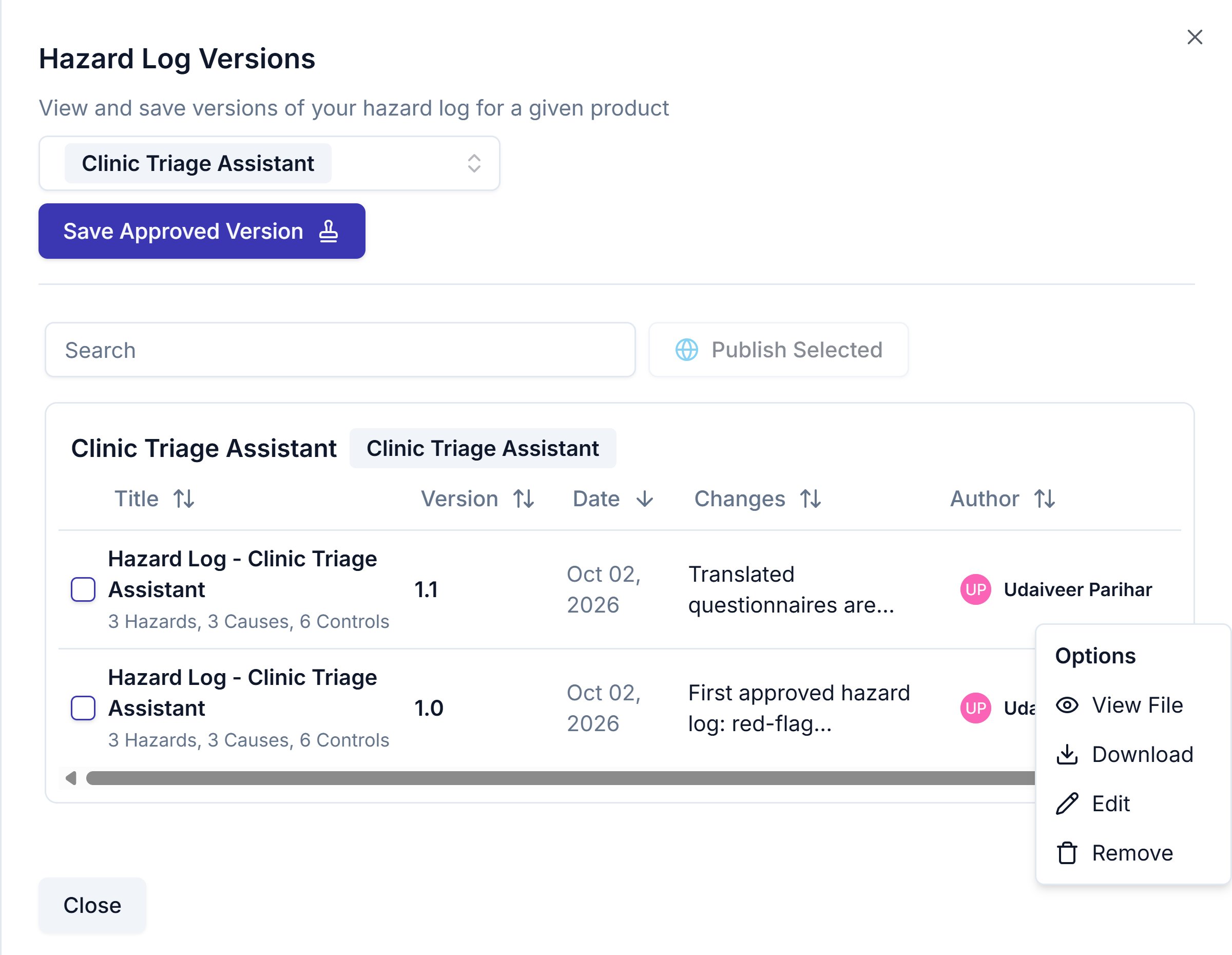 Each row has a "..." menu titled **Options**.
| Option | What it does |
| - | - |
| **View File** | Opens a preview of the version's workbook in Assuric |
| **Download** | Downloads the version's [workbook](/clinical-safety/exporting-a-hazard-log) |
| **Edit** | Opens **Edit Version** to change the *Version Title*, *Version number* and *Summary of changes*, then **Update Version** saves them without changing the hazards |
| **Remove** | Removes the version after you type its title, and warns you, without stopping you, if it's used elsewhere, such as in a published hazard log |
A version holds the hazards that weren't archived when you saved it.
To publish versions, tick one or more rows and click **Publish Selected**, which opens the **Publish new hazard log** dialog with those versions already ticked.
## Related articles
Which export to use, and what each one gives you.
Bundle approved versions and share them through your Trust Centre.
This documentation is built and hosted on [Mintlify](https://mintlify.com), a developer documentation platform.
Each row has a "..." menu titled **Options**.
| Option | What it does |
| - | - |
| **View File** | Opens a preview of the version's workbook in Assuric |
| **Download** | Downloads the version's [workbook](/clinical-safety/exporting-a-hazard-log) |
| **Edit** | Opens **Edit Version** to change the *Version Title*, *Version number* and *Summary of changes*, then **Update Version** saves them without changing the hazards |
| **Remove** | Removes the version after you type its title, and warns you, without stopping you, if it's used elsewhere, such as in a published hazard log |
A version holds the hazards that weren't archived when you saved it.
To publish versions, tick one or more rows and click **Publish Selected**, which opens the **Publish new hazard log** dialog with those versions already ticked.
## Related articles
Which export to use, and what each one gives you.
Bundle approved versions and share them through your Trust Centre.
This documentation is built and hosted on [Mintlify](https://mintlify.com), a developer documentation platform.