> ## Documentation Index
> Fetch the complete documentation index at: https://docs.assuric.com/llms.txt
> Use this file to discover all available pages before exploring further.
# Export a hazard log
> Every way to get a hazard log out of Assuric, what each route gives you, and which one to use when you send a log to someone.
**Quick summary**
* When you send a log to someone, send an approved version, not the working log.
* Customers download approved versions from your Trust Centre.
## Every export route
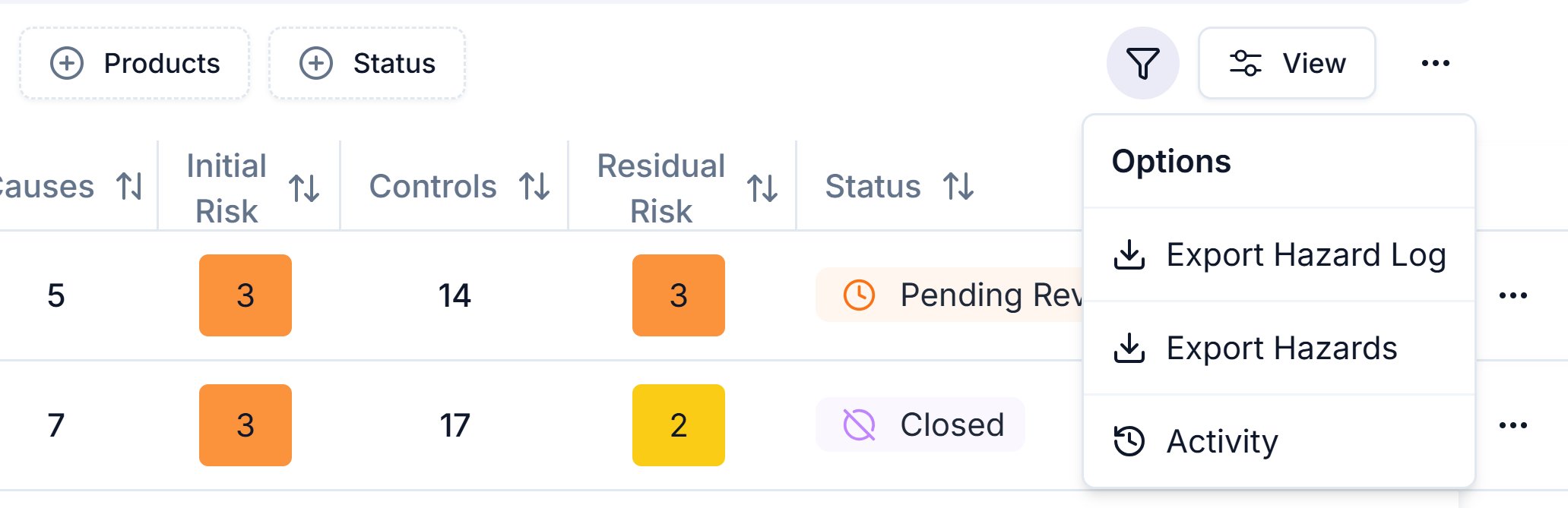
| Route | Where you find it | What you get |
| - | - | - |
| **Export Hazard Log** | **Hazard Log** page, "..." menu (**Export options**) | Your working log as an Excel workbook, for one product or all of them |
| **Export Hazards** | **Hazard Log** page, "..." menu (**Export options**) | The hazards table as a one-sheet Excel file |
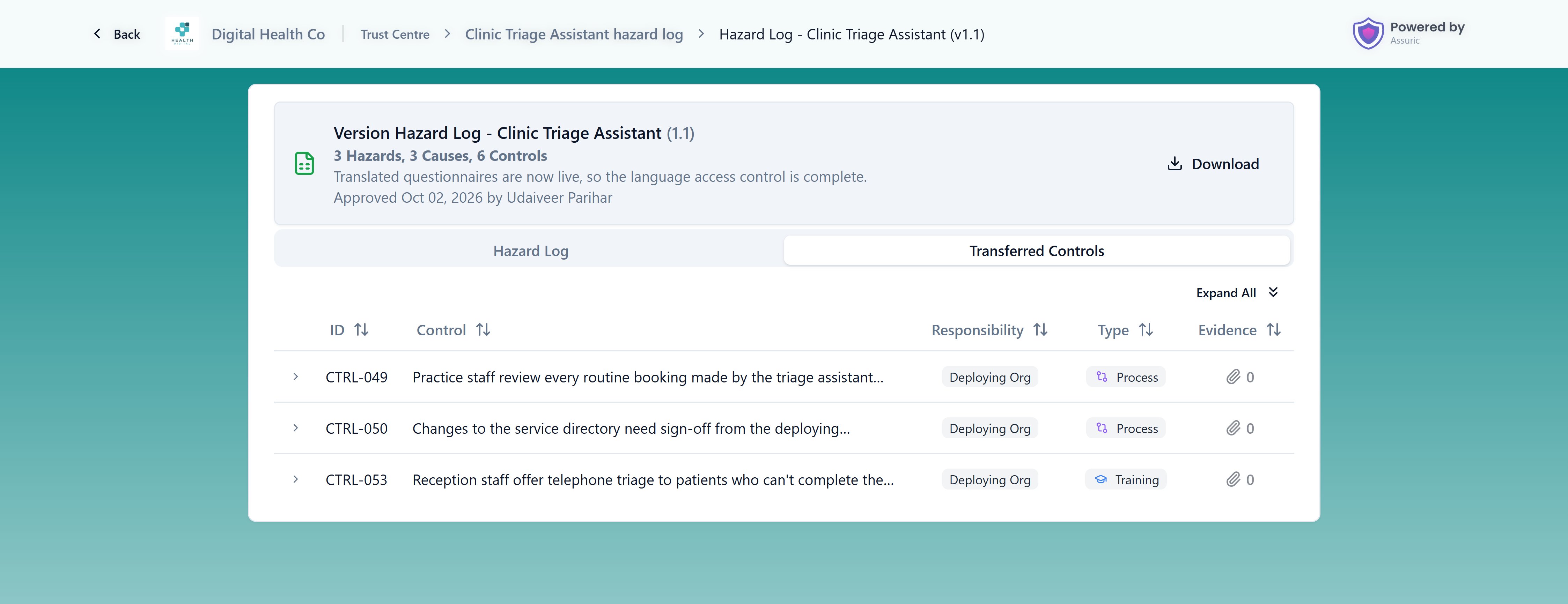
| **Download** | **Hazard Log Versions** sheet, row "..." menu | One approved version's workbook, the same file customers download |
| **View File** | **Hazard Log Versions** sheet, row "..." menu | One approved version, opened to read |
| **Download All** | Public bundle page on your Trust Centre | Every product version in a published hazard log, as a zip of workbooks or one combined workbook |
| **Download** | Public product page on your Trust Centre | One product version's workbook |
 ### Working log or approved version
Your working log changes every time someone edits it. A [version](/clinical-safety/hazard-log-approvals) doesn't:
* it's a saved, approved copy of one product's log, and its hazards never change;
* it carries a number, an approver and a date, so a recipient knows what they hold.
**Send a version.** The two exports on the **Hazard Log** page are for your own review: both give the working log as it is now, drafts included.
* **Export Hazard Log:** pick a product or *All products*, then click **Export**. You get 2 sheets per product, one in Assuric's layout and one in the NHS hazard log template layout. The NHS sheet leaves out the cover, version history, transferred controls sheet and risk matrix; to get those, [save a version](/clinical-safety/hazard-log-approvals) and download it.
* **Export Hazards:** downloads the hazards table straight away. It follows your search, leaves out archived hazards, and shows causes and controls as counts.
## What customers download
Customers read a published hazard log on screen or download it as Excel workbooks, always from approved versions.
On the bundle page, **Download All** asks how to download every product in it:
| Download mode | What it gives |
| - | - |
| **Individual hazard logs** (the default) | A zip with one workbook per product version, each including its version history |
| **Combined workbook** | One workbook with an NHS-format sheet per product and the risk matrix. No cover, version history or transferred controls |
Each product version's workbook has these sheets:
| Sheet | What it holds |
| - | - |
| **Cover** | The product, owner, version and issue date |
| **Version History** | Every approved version, with its date, approver and summary of changes |
| **NHS -** the product name | The hazard log in the NHS hazard log template layout, with controls grouped by type |
| The product name | The same log in Assuric's layout, one row per control, with its type and responsibility |
| **Transferred Controls -** the product name | The controls that are the deploying organisation's responsibility |
| **Risk Matrix** | Your risk matrix and the likelihood and severity definitions |
Evidence on a control appears as a named link to the file or URL.
A transferred control has its *Responsibility* set to *Deploying Org* (the deploying organisation operates it) rather than *Manufacturer* (you operate it).
* The public product page lists them on their own **Transferred Controls** tab for the receiving clinical safety team.
* Before you publish or send a log, filter the **Controls** tab by *Responsibility* to see everything you're handing over.
### Working log or approved version
Your working log changes every time someone edits it. A [version](/clinical-safety/hazard-log-approvals) doesn't:
* it's a saved, approved copy of one product's log, and its hazards never change;
* it carries a number, an approver and a date, so a recipient knows what they hold.
**Send a version.** The two exports on the **Hazard Log** page are for your own review: both give the working log as it is now, drafts included.
* **Export Hazard Log:** pick a product or *All products*, then click **Export**. You get 2 sheets per product, one in Assuric's layout and one in the NHS hazard log template layout. The NHS sheet leaves out the cover, version history, transferred controls sheet and risk matrix; to get those, [save a version](/clinical-safety/hazard-log-approvals) and download it.
* **Export Hazards:** downloads the hazards table straight away. It follows your search, leaves out archived hazards, and shows causes and controls as counts.
## What customers download
Customers read a published hazard log on screen or download it as Excel workbooks, always from approved versions.
On the bundle page, **Download All** asks how to download every product in it:
| Download mode | What it gives |
| - | - |
| **Individual hazard logs** (the default) | A zip with one workbook per product version, each including its version history |
| **Combined workbook** | One workbook with an NHS-format sheet per product and the risk matrix. No cover, version history or transferred controls |
Each product version's workbook has these sheets:
| Sheet | What it holds |
| - | - |
| **Cover** | The product, owner, version and issue date |
| **Version History** | Every approved version, with its date, approver and summary of changes |
| **NHS -** the product name | The hazard log in the NHS hazard log template layout, with controls grouped by type |
| The product name | The same log in Assuric's layout, one row per control, with its type and responsibility |
| **Transferred Controls -** the product name | The controls that are the deploying organisation's responsibility |
| **Risk Matrix** | Your risk matrix and the likelihood and severity definitions |
Evidence on a control appears as a named link to the file or URL.
A transferred control has its *Responsibility* set to *Deploying Org* (the deploying organisation operates it) rather than *Manufacturer* (you operate it).
* The public product page lists them on their own **Transferred Controls** tab for the receiving clinical safety team.
* Before you publish or send a log, filter the **Controls** tab by *Responsibility* to see everything you're handing over.
 ## Related articles
Save an approved version to export or publish.
Give customers a link instead of a file.
This documentation is built and hosted on [Mintlify](https://mintlify.com), a developer documentation platform.
## Related articles
Save an approved version to export or publish.
Give customers a link instead of a file.
This documentation is built and hosted on [Mintlify](https://mintlify.com), a developer documentation platform.