> ## Documentation Index
> Fetch the complete documentation index at: https://docs.assuric.com/llms.txt
> Use this file to discover all available pages before exploring further.
# Clinical safety case report
> Create a clinical safety case report (CSCR) for each product, pull in the hazards it must discuss with a live hazard log table, and track it through the CSCR tasks.
**Quick summary**
* Create your CSCR, usually one per product, from a template in **Templates** or your own file.
* A live **Hazard Log Summary** keeps the report's hazards current, filtered to its product and risk.
* In **Tasks**, a product can have 2 CSCR tasks: completing and maintaining the report, and your CSO's sign-off.
## Create it in Assuric
Go to **Documents** and open the **Templates** tab. In [Assuric Templates](/documents/templates-and-document-catalogue), find **\[TEMPLATE] Clinical Safety Case Report**.
Click **Create from template** on its row, then:
* Fill in the [document's details](/documents/creating-a-document#fill-in-the-document-details), permissions and review schedule.
* Set *Products* to the product the report covers.
* Tick *Controlled* if it needs a formal review and approval cycle.
Click **Create** to open the report with its placeholders filled in from your workspace.
To use a clinical safety case report (CSCR) you've written, [upload it](/documents/creating-a-document#start-a-document) instead (`.docx`, `.doc` or `.xlsx`, up to 50 MB), then replace a pasted hazard table with a live one, and repeated values with placeholders.
With several products, clone your first CSCR to a template so you don't rebuild its structure (**⋯** → **Clone to template** on the **Documents** tab), then start each other report from it.
## Assuric features for your CSCR
| Feature | What it does in a CSCR |
| - | - |
| **Hazard Log Summary** | A [live table of your hazard log](/clinical-safety/clinical-documentation#the-live-hazard-log-table) that shows the hazards the report discusses: filter it to the report's product and to *Undesirable initial risk*, *Undesirable residual risk* or both (with both, a hazard must meet both) |
| **Version and approval tables** | **Document Version History** and **Document Approval Table** record each approved [version](/documents/versions-and-version-history) and who approved it |
| **Placeholders** | **Document Scoped Product(s)** names the report's product, and a **Role** [placeholder](/documents/default-placeholders#people-and-roles) names your clinical safety officer (CSO). A synced content block keeps the people involved the same as in your clinical risk management plan (CRMP) |
To edit, approve and publish the report, see [Manage, approve and publish clinical documents](/clinical-safety/managing-clinical-documents).
## The CSCR as a task
Filter **Tasks** for "Safety Case Report" and the *Product* group expands into each product's CSCR tasks.
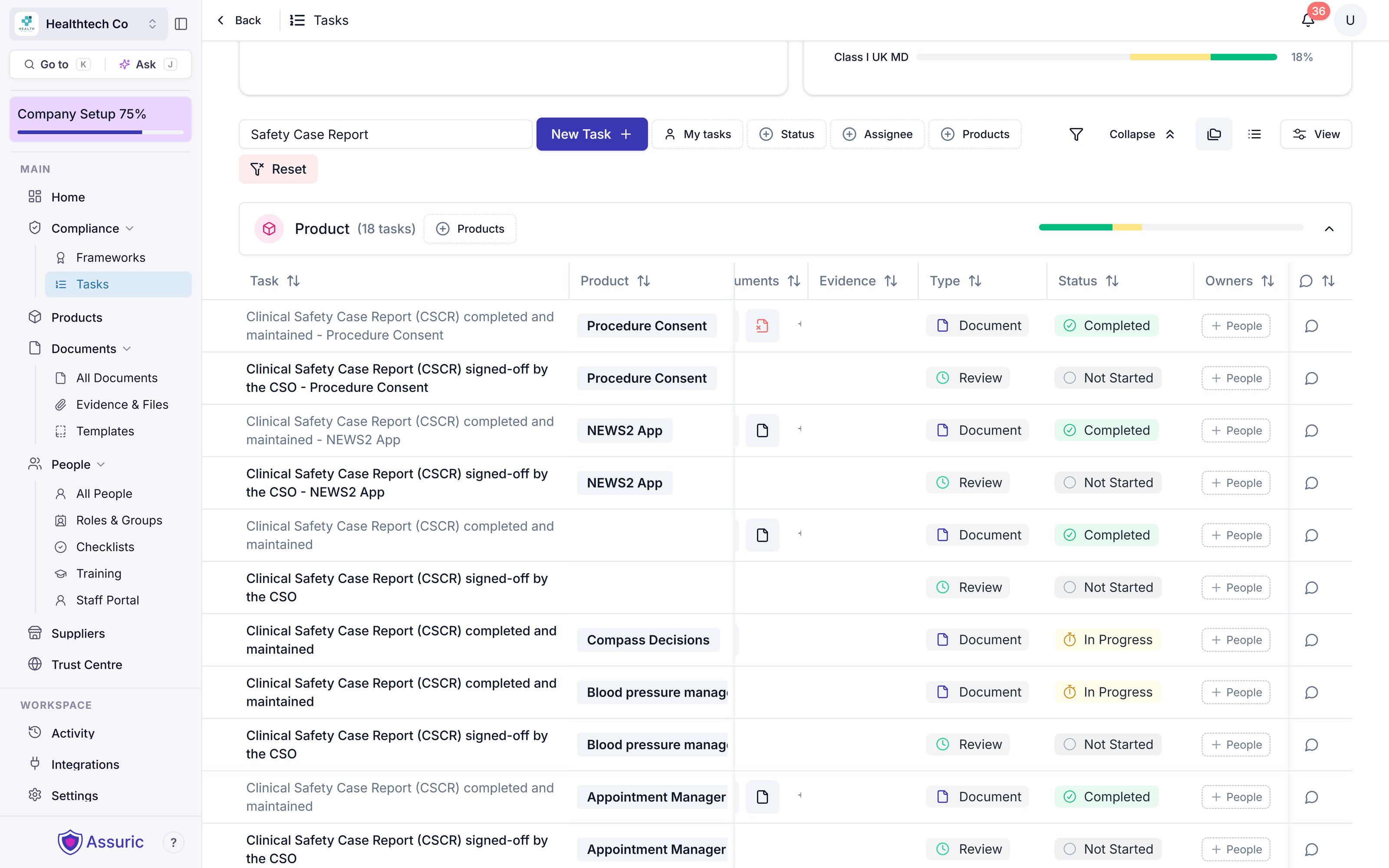 You [track and sign off each product's report](/tasks/product-specific-tasks) separately.
## What goes in a CSCR
**To be written by Assuric's clinical safety officers.** This section will cover:
* What the CSCR is for, and who reads it
* The sections a CSCR needs, and which template sections map to them
* How the CSCR refers to the CRMP and the hazard log
## Which hazards the CSCR discusses
**To be written by Assuric's clinical safety officers.** This section will cover:
* Which hazards a CSCR must discuss (for example, those with a high initial or residual risk)
* How to set the Hazard Log Summary filters to match
* How to discuss hazards whose residual risk stays undesirable, and the ALARP justification
## Sign-off and keeping the CSCR current
**To be written by Assuric's clinical safety officers.** This section will cover:
* What the CSO checks before signing off
* Which changes to the product or hazard log should trigger a new approved version
* Sharing the approved CSCR with deploying organisations
## Related articles
The Assuric features that keep clinical safety documents current.
Edit, version, approve and publish your CSCR.
This documentation is built and hosted on [Mintlify](https://mintlify.com), a developer documentation platform.
You [track and sign off each product's report](/tasks/product-specific-tasks) separately.
## What goes in a CSCR
**To be written by Assuric's clinical safety officers.** This section will cover:
* What the CSCR is for, and who reads it
* The sections a CSCR needs, and which template sections map to them
* How the CSCR refers to the CRMP and the hazard log
## Which hazards the CSCR discusses
**To be written by Assuric's clinical safety officers.** This section will cover:
* Which hazards a CSCR must discuss (for example, those with a high initial or residual risk)
* How to set the Hazard Log Summary filters to match
* How to discuss hazards whose residual risk stays undesirable, and the ALARP justification
## Sign-off and keeping the CSCR current
**To be written by Assuric's clinical safety officers.** This section will cover:
* What the CSO checks before signing off
* Which changes to the product or hazard log should trigger a new approved version
* Sharing the approved CSCR with deploying organisations
## Related articles
The Assuric features that keep clinical safety documents current.
Edit, version, approve and publish your CSCR.
This documentation is built and hosted on [Mintlify](https://mintlify.com), a developer documentation platform.