> ## Documentation Index
> Fetch the complete documentation index at: https://docs.assuric.com/llms.txt
> Use this file to discover all available pages before exploring further.
# Clinical documentation
> The Assuric features that keep your CRMP and CSCR current: a live hazard log table filtered by product, status and risk, and how placeholders, content blocks and version tables fit in.
**Quick summary**
* Clinical safety documents are ordinary Assuric documents, but the hazard log is a log of its own, with its own approval.
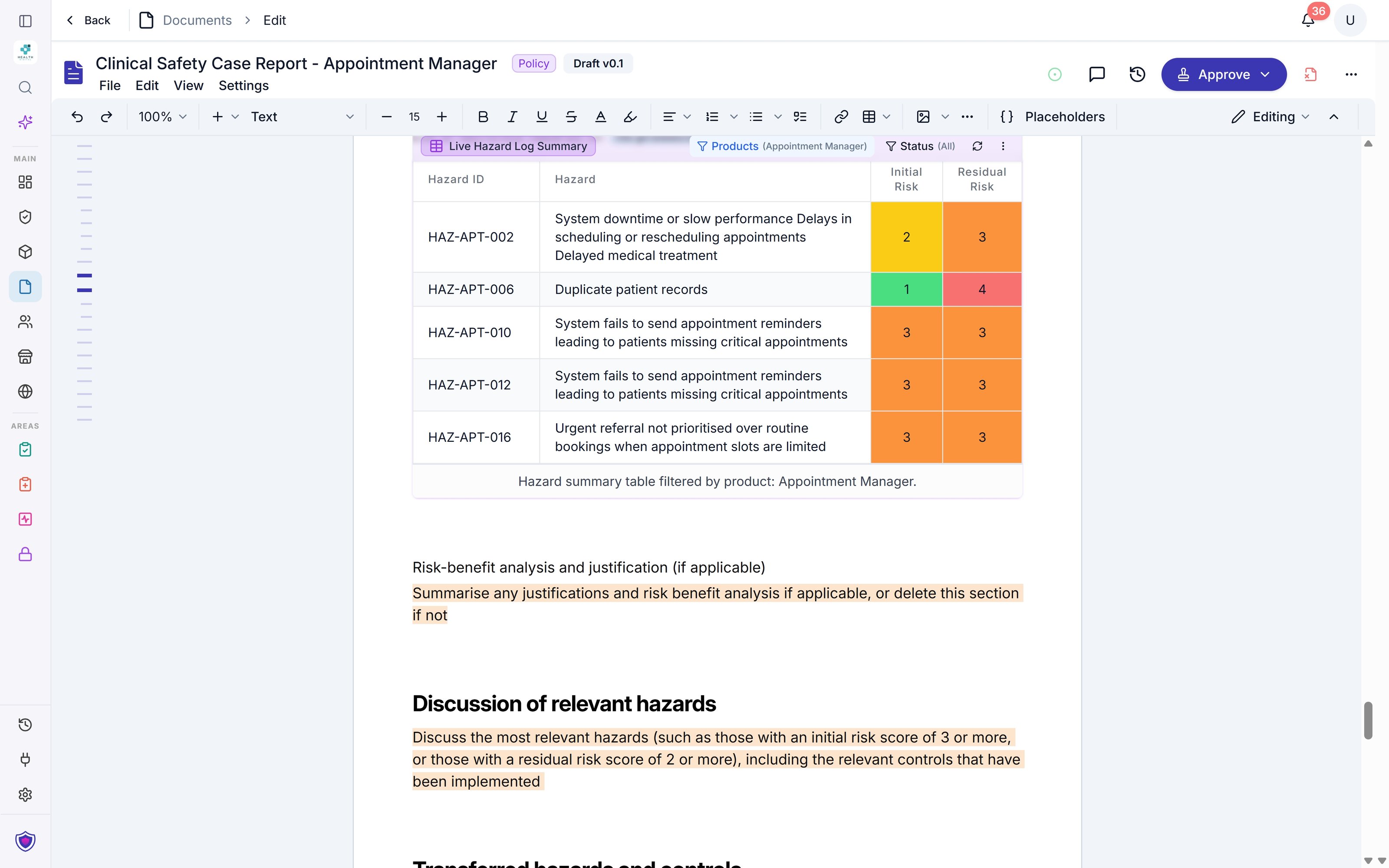
* A live **Hazard Log Summary** table shows the hazards a document must discuss, and updates as your hazard log changes.
* An approved version freezes its **Hazard Log Summary** rows, so an approved CSCR records the hazard log at sign-off.
Clinical safety documents are ordinary Assuric documents, so everything in [Documents](/documents/key-capabilities) applies to them.
## Clinical safety documents
DCB0129's safety case has 3 deliverables, and customers usually ask for all three (see [Choosing what to publish](/trust-centre/what-to-publish)).
| Document | What it is in Assuric |
| - | - |
| **Hazard log** | Not a document: a log under **Clinical Safety** → **Hazard Log**, with its own [approval](/clinical-safety/hazard-log-approvals), export and publishing |
| **Clinical safety case report (CSCR)** | A [document you create from a template](/clinical-safety/cscr), usually one per product |
| **Clinical risk management plan (CRMP)** | A [document you create from a template](/clinical-safety/crmp) |
## The live hazard log table
The **Hazard Log Summary** is a live table of rows from your hazard log, and it updates when the log changes. To add one, type `@` in the editor or click **Placeholders** in the toolbar, then pick **Hazard Log Summary** under **Tables**.
Click the table to configure it:
* **Filters:** *Filter by Products*, *Filter by Status* and *Filter by Risk Level*. The last has 2 switches, *Undesirable initial risk* and *Undesirable residual risk*. Each keeps hazards rated undesirable or unacceptable, and with both on, a hazard must meet both.
* **Columns** and **Appearance:** as for [any live table](/documents/placeholders#configure-a-live-table).
For example, filter a CSCR's table to its product and undesirable residual risk to list the hazards the report must discuss. A hazard that later crosses the threshold appears without any edit.
 A **Hazard Risk Summary Table** counts your hazards in each risk band at initial and residual risk, and filters by product and status in the same way. Its bands are *Low*, *Moderate*, *Significant*, *High* and *Very High* (ratings 1 to 5), which the hazard log groups as:
* *Acceptable* (1 and 2)
* *Undesirable* (3)
* *Unacceptable* (4 and 5)
A live table keeps updating in the editor, but an approved version [freezes its rows](/documents/default-placeholders#live-content-and-approved-versions), so an approved CSCR records the hazard log as it stood at sign-off.
**What we recommend**
Use a **Hazard Log Summary** wherever a document lists hazards, rather than a pasted table.
## Placeholders, content blocks and version tables
| Feature | What it does |
| - | - |
| **Placeholders** | Keep [values like your company details and the clinical safety officer's name](/documents/default-placeholders#people-and-roles) the same in every document: change one and every document updates |
| **Document Scoped Product(s)** | Names the product a document covers, so a CSCR names its product without you typing it |
| **Synced Content Block** | Stays identical everywhere it's used, as a [custom placeholder](/documents/placeholders#create-a-custom-placeholder) |
| **Pastable Content Block** | Pastes a one-off copy you adapt |
| **Version and approval tables** | Fill themselves in each time you approve a [version](/documents/versions-and-version-history) |
## Clinical documentation pages
Create your [CRMP](/clinical-safety/crmp) and [CSCR](/clinical-safety/cscr), then [edit, approve and publish them](/clinical-safety/managing-clinical-documents).
## Related articles
Insert placeholders, configure a live table, and create your own blocks.
Create your CSCR, with the hazard log pulled in.
This documentation is built and hosted on [Mintlify](https://mintlify.com), a developer documentation platform.
A **Hazard Risk Summary Table** counts your hazards in each risk band at initial and residual risk, and filters by product and status in the same way. Its bands are *Low*, *Moderate*, *Significant*, *High* and *Very High* (ratings 1 to 5), which the hazard log groups as:
* *Acceptable* (1 and 2)
* *Undesirable* (3)
* *Unacceptable* (4 and 5)
A live table keeps updating in the editor, but an approved version [freezes its rows](/documents/default-placeholders#live-content-and-approved-versions), so an approved CSCR records the hazard log as it stood at sign-off.
**What we recommend**
Use a **Hazard Log Summary** wherever a document lists hazards, rather than a pasted table.
## Placeholders, content blocks and version tables
| Feature | What it does |
| - | - |
| **Placeholders** | Keep [values like your company details and the clinical safety officer's name](/documents/default-placeholders#people-and-roles) the same in every document: change one and every document updates |
| **Document Scoped Product(s)** | Names the product a document covers, so a CSCR names its product without you typing it |
| **Synced Content Block** | Stays identical everywhere it's used, as a [custom placeholder](/documents/placeholders#create-a-custom-placeholder) |
| **Pastable Content Block** | Pastes a one-off copy you adapt |
| **Version and approval tables** | Fill themselves in each time you approve a [version](/documents/versions-and-version-history) |
## Clinical documentation pages
Create your [CRMP](/clinical-safety/crmp) and [CSCR](/clinical-safety/cscr), then [edit, approve and publish them](/clinical-safety/managing-clinical-documents).
## Related articles
Insert placeholders, configure a live table, and create your own blocks.
Create your CSCR, with the hazard log pulled in.
This documentation is built and hosted on [Mintlify](https://mintlify.com), a developer documentation platform.