> ## Documentation Index
> Fetch the complete documentation index at: https://docs.assuric.com/llms.txt
> Use this file to discover all available pages before exploring further.
# Navigating Assuric
> How to sign in and find your way around Assuric.
**Quick summary**
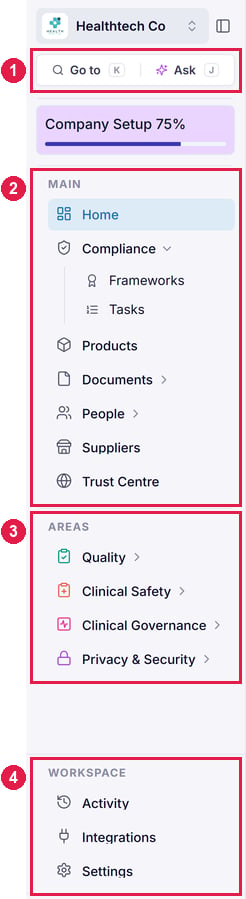
* The sidebar on the left is how you get around. It's split into **Main**, **Areas** and **Workspace**.
* The bell and your avatar in the top right cover notifications and your account. The chat bubble, in the bottom right, reaches the Assuric team.
## Sign in
Assuric runs in the browser and uses passwordless sign-in. Enter your email address and we'll send you a secure link and code. Click the link or enter the code to open your workspace.
* **Single sign-on (SSO):** Sign in with your Google account, or get in touch if your organisation uses a different identity provider and we can arrange custom SSO.
* **Multi-factor authentication (MFA):** Add MFA with an authenticator app, and sign-in also asks for a one-time code from your phone. An Admin can [require it](/settings/access-and-security) for chosen permission levels.
If you're not receiving the link, check the address matches the one you were invited on.
## Get familiar with the sidebar
The sidebar is how you move around Assuric. To give yourself more room, collapse it using the button next to your workspace name.
1. At the top, **Go to** (**Ctrl+K**, or **Cmd+K** on a Mac) jumps to any page or framework, and **Ask** (**Ctrl+J**) opens [Ask Assuric](/ask-assuric/overview), our AI assistant.
2. **Main** holds the features every workspace has, such as Frameworks, Tasks, Documents, People and Trust Centre.
3. **Areas** holds Quality, Clinical Safety, Clinical Governance and Privacy & Security. You'll only see the ones your workspace has access to. If you need another, get in touch with our team!
4. **Workspace** holds **Activity** (your activity log), **Integrations** and **Settings**.
 ### What's in Main
| Page | What it's for |
| :- | :- |
| **Home** | An overview of your progress across every framework, plus reporting. |
| **Compliance** | Expand it for **Frameworks**, a breakdown of your [frameworks](/frameworks/key-capabilities) and their requirements, and **Tasks**, the [work](/tasks/key-capabilities) that satisfies them. |
| **Products** | Where you add your products, each with a description and optional owners, then map it to specific frameworks to unlock product-specific tasks. |
| **Documents** | A built-in document editor and a repository for all your documents and evidence, with **All Documents**, **Evidence & Files** and **Templates** when you expand it. |
| **People** | Your staff, their [roles and groups, checklists, training and the staff portal](/people/key-capabilities). |
| **Suppliers** | The suppliers you rely on, with their risk ratings and agreements. See [Suppliers](/privacy-security/suppliers). |
| **Trust Centre** | What you share with buyers, investors and partners to prove your work, which you can customise and fill with the evidence you choose to publish. |
### What's in Areas
| Area | What it covers | Frameworks it may include |
| :- | :- | :- |
| **Quality** | Your electronic quality management system, which holds the procedures, records and checks that keep quality consistent across the product lifecycle. | ISO 9001, ISO 13485 |
| **Clinical Safety** | Identifying clinical hazards, implementing safety controls, and maintaining compliance to protect patients and reduce risk, plus the **Hazard Log** and clinical **Incidents**. | DCB0129, Class I UK MD |
| **Clinical Governance** | Clinical oversight and accountability, and the regulations you're assessed against as a care provider. | [CQC](/assuric-overview/glossary#abbreviations) |
| **Privacy & Security** | How you safeguard the personal data you hold on patients and users, and manage your information assets, devices, data processing and the risks around them. | ISO 27001, GDPR, [DSPT](/assuric-overview/glossary#abbreviations), Cyber Essentials, SOC 2, HIPAA |
## Other things you need to know
* **Support chat.** Click the chat bubble in the bottom right to message our support team about anything you're stuck on. You can attach screenshots, and your past conversations are saved so you can pick them back up later.
* **Assuric AI.** The AI bubble opens [Ask Assuric](/ask-assuric/overview) on whatever page you're on, so you can keep it beside your work instead of navigating back to Ask.
* **Notification preferences.** Assuric notifies you about things like tasks assigned to you, upcoming due dates and items waiting for your approval. You choose which ones are emailed to you and which only appear in Assuric. Change them from **Notification Preferences** in your account menu. See [Personal notification settings](/notifications/personal-notification-settings).
**Screenshot coming soon.** We'll replace this with a new screenshot of the top right of every page, showing the notification bell and your account menu.
## Related articles
The information the rest of the platform draws on.
Get your colleagues into the workspace.
This documentation is built and hosted on [Mintlify](https://mintlify.com), a developer documentation platform.
### What's in Main
| Page | What it's for |
| :- | :- |
| **Home** | An overview of your progress across every framework, plus reporting. |
| **Compliance** | Expand it for **Frameworks**, a breakdown of your [frameworks](/frameworks/key-capabilities) and their requirements, and **Tasks**, the [work](/tasks/key-capabilities) that satisfies them. |
| **Products** | Where you add your products, each with a description and optional owners, then map it to specific frameworks to unlock product-specific tasks. |
| **Documents** | A built-in document editor and a repository for all your documents and evidence, with **All Documents**, **Evidence & Files** and **Templates** when you expand it. |
| **People** | Your staff, their [roles and groups, checklists, training and the staff portal](/people/key-capabilities). |
| **Suppliers** | The suppliers you rely on, with their risk ratings and agreements. See [Suppliers](/privacy-security/suppliers). |
| **Trust Centre** | What you share with buyers, investors and partners to prove your work, which you can customise and fill with the evidence you choose to publish. |
### What's in Areas
| Area | What it covers | Frameworks it may include |
| :- | :- | :- |
| **Quality** | Your electronic quality management system, which holds the procedures, records and checks that keep quality consistent across the product lifecycle. | ISO 9001, ISO 13485 |
| **Clinical Safety** | Identifying clinical hazards, implementing safety controls, and maintaining compliance to protect patients and reduce risk, plus the **Hazard Log** and clinical **Incidents**. | DCB0129, Class I UK MD |
| **Clinical Governance** | Clinical oversight and accountability, and the regulations you're assessed against as a care provider. | [CQC](/assuric-overview/glossary#abbreviations) |
| **Privacy & Security** | How you safeguard the personal data you hold on patients and users, and manage your information assets, devices, data processing and the risks around them. | ISO 27001, GDPR, [DSPT](/assuric-overview/glossary#abbreviations), Cyber Essentials, SOC 2, HIPAA |
## Other things you need to know
* **Support chat.** Click the chat bubble in the bottom right to message our support team about anything you're stuck on. You can attach screenshots, and your past conversations are saved so you can pick them back up later.
* **Assuric AI.** The AI bubble opens [Ask Assuric](/ask-assuric/overview) on whatever page you're on, so you can keep it beside your work instead of navigating back to Ask.
* **Notification preferences.** Assuric notifies you about things like tasks assigned to you, upcoming due dates and items waiting for your approval. You choose which ones are emailed to you and which only appear in Assuric. Change them from **Notification Preferences** in your account menu. See [Personal notification settings](/notifications/personal-notification-settings).
**Screenshot coming soon.** We'll replace this with a new screenshot of the top right of every page, showing the notification bell and your account menu.
## Related articles
The information the rest of the platform draws on.
Get your colleagues into the workspace.
This documentation is built and hosted on [Mintlify](https://mintlify.com), a developer documentation platform.