> ## Documentation Index
> Fetch the complete documentation index at: https://docs.assuric.com/llms.txt
> Use this file to discover all available pages before exploring further.
# Ask Assuric: what it can do
> Open Ask Assuric, choose a mode, add files or documents, and pick what it searches.
**Quick summary**
* Ask Assuric is Assuric's AI assistant, with 3 modes: **Auto**, **Hazard Log Assistant** and **Questionnaire Assistant**.
* Ask Assuric answers from your workspace unless you choose *Web*. Open it with **Ctrl+J** or **Ask** in the sidebar.
* Ask Assuric is in beta, so check what it tells you: you're accountable for what you act on or submit.
## Open Ask Assuric
Click **Ask** at the top of the sidebar, or press **Ctrl+J**. A window opens on the **Ask Assuric** tab, next to **Go to**. Type a question or command and click **Send**, and the conversation opens as a full-page chat.
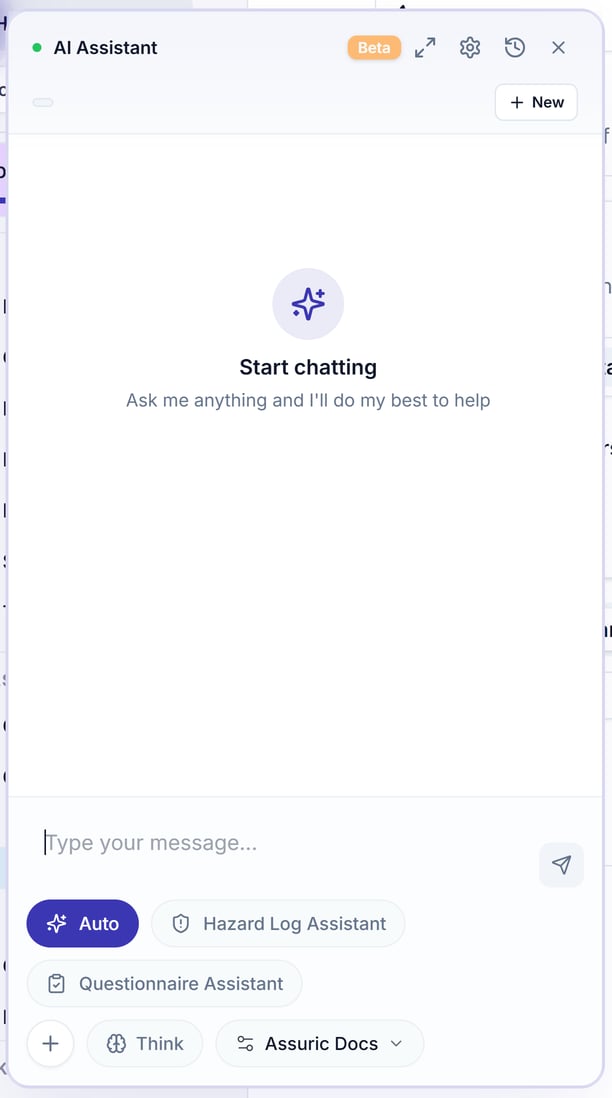
You can also click the AI bubble (the sparkle button) at the top right of the page to open a floating *AI Assistant* panel beside your work, with the same modes, *Think* and source picker.
 ## Choose a mode
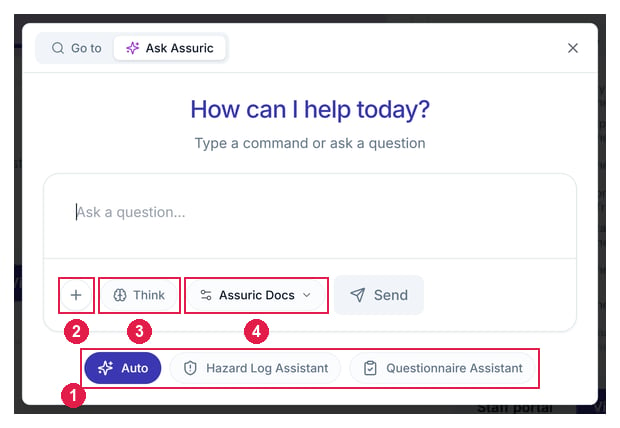
The 3 mode buttons sit under the message box; your pick shows as a label on your message.
## Choose a mode
The 3 mode buttons sit under the message box; your pick shows as a label on your message.
 | Mode | Use it for |
| - | - |
| **Auto** | General [questions about your workspace](/ask-assuric/ask-your-workspace), documents and frameworks |
| **Hazard Log Assistant** | [Adding hazards, causes and controls](/ask-assuric/hazard-log-assistant) to a product's hazard log, and asking questions about it |
| **Questionnaire Assistant** | [Security and compliance questionnaires](/ask-assuric/questionnaire-assistant): paste or upload the questions and it drafts cited answers, including [the DSPT](/ask-assuric/questionnaire-assistant#for-the-dspt) |
## Add context and choose what it searches
Under the message box:
* **+** adds something to work with: **Upload file**, **Add document** or **Add evidence**.
* *Think* reasons through the question before it answers. It's off until clicked. Turn it on for harder questions, such as mapping a policy to several frameworks.
* *Assuric Docs* is the source picker. It starts there, so answers come from your workspace. Switch it to *Web* to search the web instead, one source at a time.
## Chat history
The full-page chat keeps every conversation in **Chat History** on the left, with **New Chat** above it. Each is titled automatically; its options let you **Rename** or **Delete** it.
Under each reply, *Assuric Docs* answers list their sources, and *Web* answers list their links under *Web Sources*.
## Settings
Click the gear at the top of the chat to open **Settings → AI Settings**:
| Setting | What it does |
| - | - |
| *Always show AI chat assistant* | Keeps the assistant button on every page, and if you turn it off you can still reach Ask Assuric from the sidebar. |
| *Floating chat size* | Sets the floating chat window to *Small*, *Medium* or *Large*, and you can also drag the window to resize it. |
Ask Assuric is in beta and AI can make mistakes. You're accountable for whatever you act on or submit, so check answers against the source, especially anything going to a regulator or customer.
## Related articles
Auto mode, Think, the Web, and your chat history.
Draft a hazard, cause and control and check the proposal first.
Paste or upload questions and get cited answers.
This documentation is built and hosted on [Mintlify](https://mintlify.com), a developer documentation platform.
| Mode | Use it for |
| - | - |
| **Auto** | General [questions about your workspace](/ask-assuric/ask-your-workspace), documents and frameworks |
| **Hazard Log Assistant** | [Adding hazards, causes and controls](/ask-assuric/hazard-log-assistant) to a product's hazard log, and asking questions about it |
| **Questionnaire Assistant** | [Security and compliance questionnaires](/ask-assuric/questionnaire-assistant): paste or upload the questions and it drafts cited answers, including [the DSPT](/ask-assuric/questionnaire-assistant#for-the-dspt) |
## Add context and choose what it searches
Under the message box:
* **+** adds something to work with: **Upload file**, **Add document** or **Add evidence**.
* *Think* reasons through the question before it answers. It's off until clicked. Turn it on for harder questions, such as mapping a policy to several frameworks.
* *Assuric Docs* is the source picker. It starts there, so answers come from your workspace. Switch it to *Web* to search the web instead, one source at a time.
## Chat history
The full-page chat keeps every conversation in **Chat History** on the left, with **New Chat** above it. Each is titled automatically; its options let you **Rename** or **Delete** it.
Under each reply, *Assuric Docs* answers list their sources, and *Web* answers list their links under *Web Sources*.
## Settings
Click the gear at the top of the chat to open **Settings → AI Settings**:
| Setting | What it does |
| - | - |
| *Always show AI chat assistant* | Keeps the assistant button on every page, and if you turn it off you can still reach Ask Assuric from the sidebar. |
| *Floating chat size* | Sets the floating chat window to *Small*, *Medium* or *Large*, and you can also drag the window to resize it. |
Ask Assuric is in beta and AI can make mistakes. You're accountable for whatever you act on or submit, so check answers against the source, especially anything going to a regulator or customer.
## Related articles
Auto mode, Think, the Web, and your chat history.
Draft a hazard, cause and control and check the proposal first.
Paste or upload questions and get cited answers.
This documentation is built and hosted on [Mintlify](https://mintlify.com), a developer documentation platform.