> ## Documentation Index
> Fetch the complete documentation index at: https://docs.assuric.com/llms.txt
> Use this file to discover all available pages before exploring further.
# Add hazards with the Hazard Log Assistant
> Ask Assuric to draft a hazard, its cause and its control, check the proposal, and have it written to your hazard log.
**Quick summary**
* The Hazard Log Assistant, a mode of [Ask Assuric](/ask-assuric/overview), drafts a hazard, its cause and its control from plain English.
* The assistant proposes each entry, then writes to the product you name only after you confirm.
* The Hazard Log Assistant only drafts. It can't delete anything, approve a version or publish your log, so you review, score and approve as usual.
Use it when you already know the clinical risk and want it in the [hazard log](/clinical-safety/hazard-log) without filling in forms.
## Before you start
* Pick the product: the assistant works on one product at a time and changes only that one.
* For an initial rating, have a rough likelihood and severity in mind, or leave them blank and score later.
## Add a hazard, cause and control
Press **Ctrl+J**, or click **Ask** at the top of the sidebar, and choose **Hazard Log Assistant** under the message box.
Write it as you'd say it to a colleague. For example:
> Add a hazard to the Clinic Triage Assistant product: an urgent red-flag symptom is not detected, so the patient is offered a routine appointment instead of same-day clinical review.
Click **Send**.
The assistant proposes the hazard with a suggested harm, and asks what to set before it writes anything.
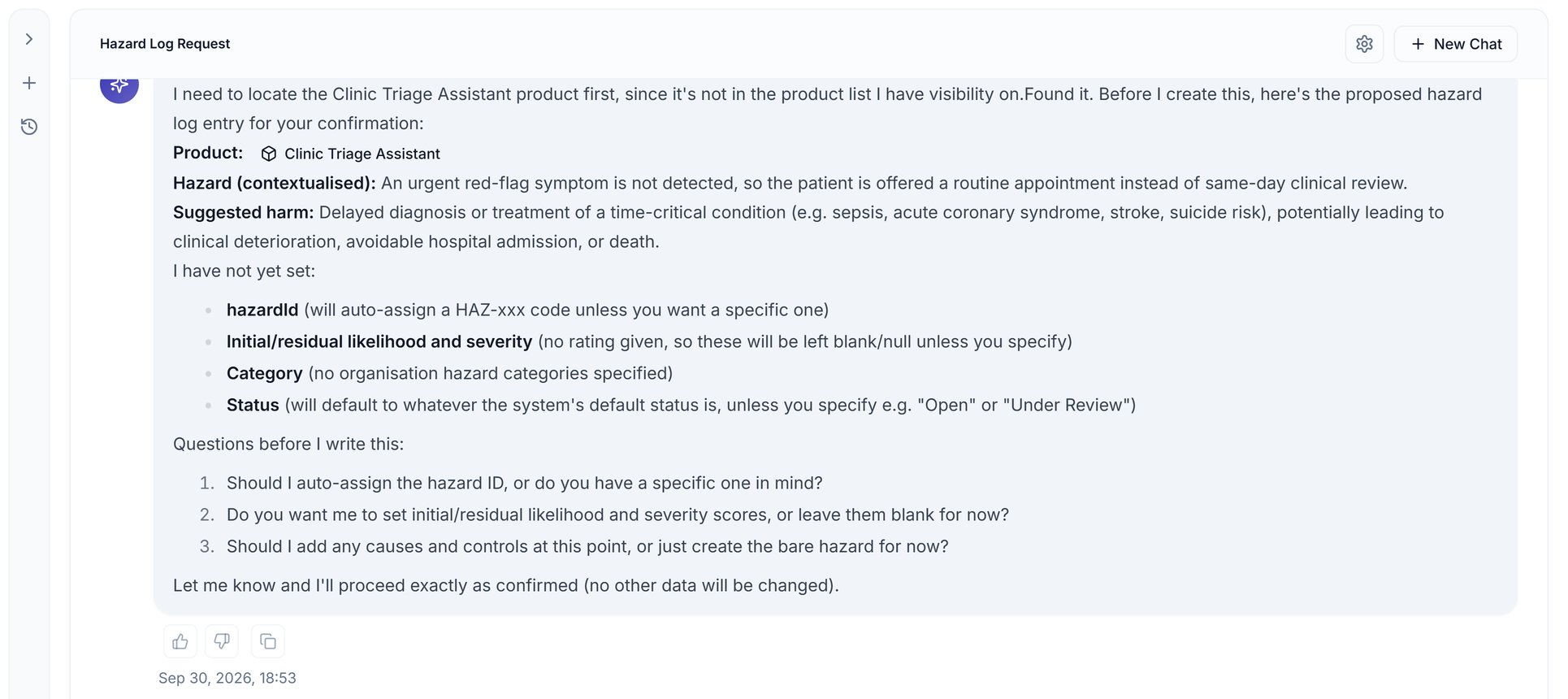 Answer its questions in one message, as in the screenshot below: the ID, any scores, and the cause and control to add. The assistant creates them in the same log you'd edit by hand, so they appear straight away.
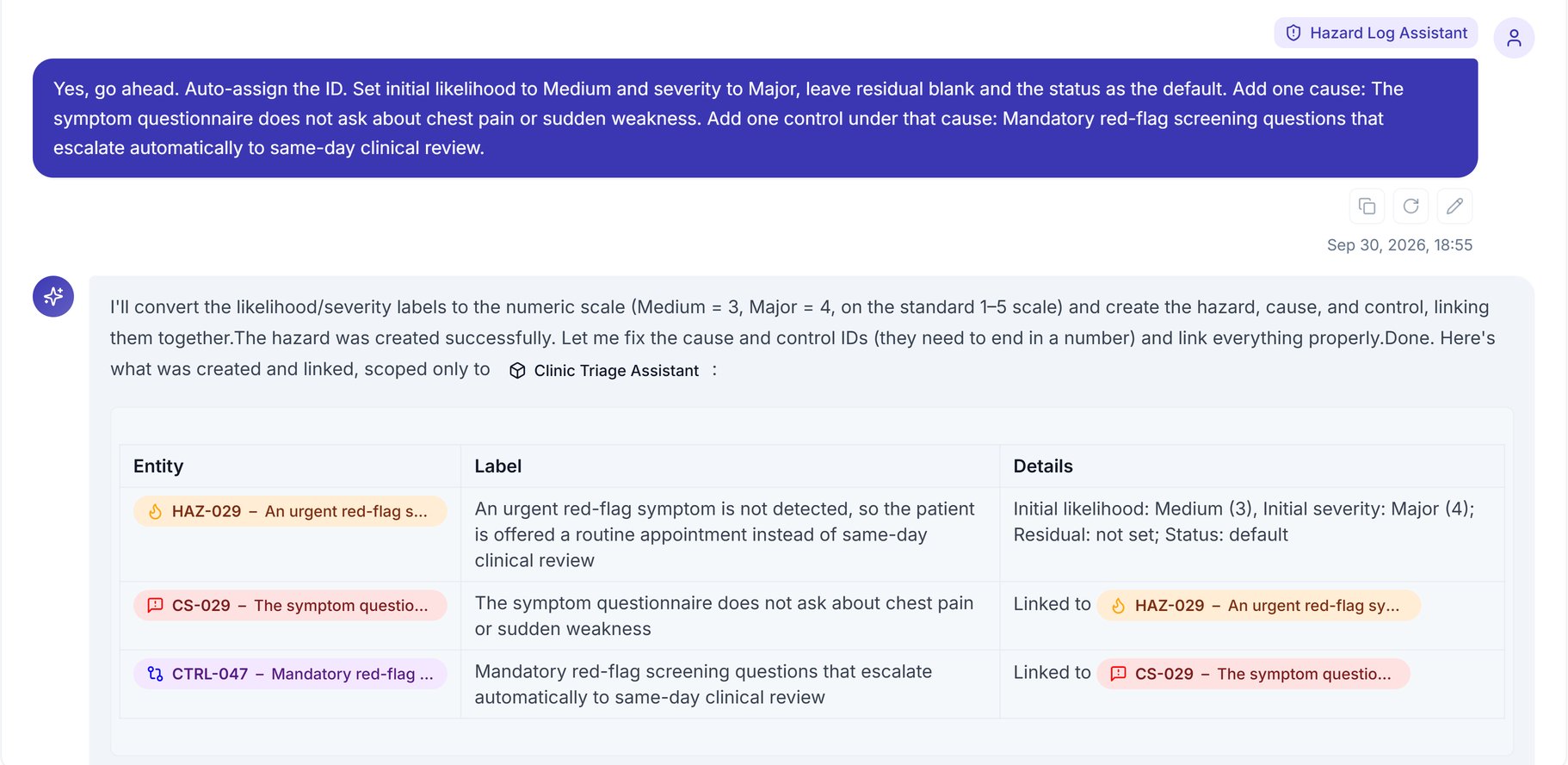 In **Clinical Safety → Hazard Log**, open the new hazard under its product and check its wording, scores and links before anyone relies on them.
* The assistant turns words like Medium and Major into numbers on the log's scale, so check the rating matches what you meant.
* The control it creates has no evidence attached yet.
* The assistant only drafts: your clinical safety officer decides whether a risk is acceptable.
## Change or undo an entry
Ask for a change the same way, naming the hazard and product:
> In the Clinic Triage Assistant product, set HAZ-029's residual likelihood to Low and severity to Considerable, and wait for my confirmation.
The assistant shows each field's current and proposed value, and changes nothing else. Once you confirm, it saves the change and recalculates the residual risk score.
To reverse a change, ask it to undo it: it proposes the old values and restores them once you confirm. Undoing a residual rating clears the residual likelihood, severity and risk.
## What it can't do
It can't:
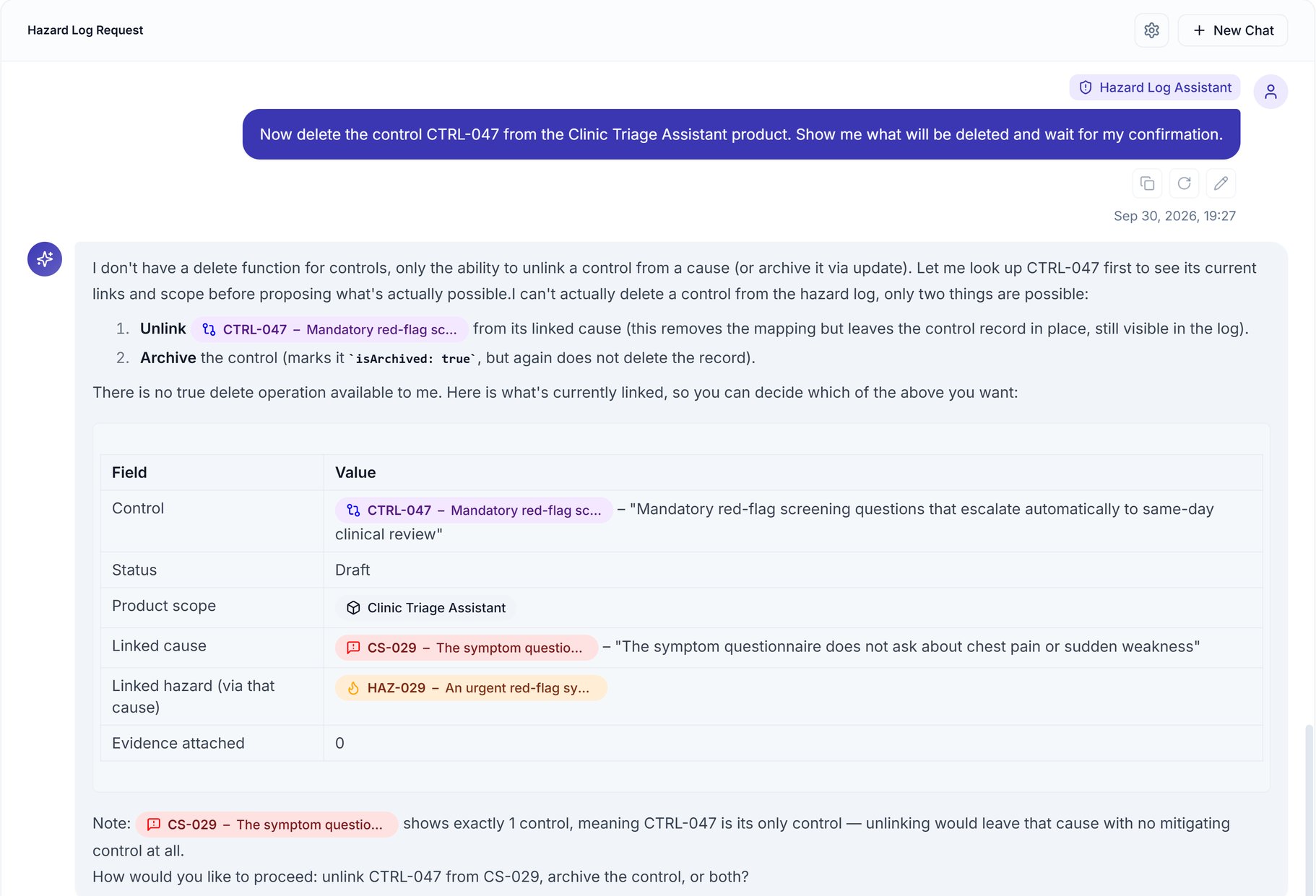
* Delete a hazard, cause or control. Asked to delete a control, it offers to unlink or archive it instead.
* Approve a new version of the log or publish it to your Trust Centre.
* Work on clinical documents. Today it works only on the hazard log.
To import an existing Excel or CSV hazard log or update many hazards at once, connect Claude, ChatGPT or another assistant through the [Assuric MCP Server](/integrations/mcp-server#work-in-your-hazard-log) with *Editor* access.
In **Clinical Safety → Hazard Log**, open the new hazard under its product and check its wording, scores and links before anyone relies on them.
* The assistant turns words like Medium and Major into numbers on the log's scale, so check the rating matches what you meant.
* The control it creates has no evidence attached yet.
* The assistant only drafts: your clinical safety officer decides whether a risk is acceptable.
## Change or undo an entry
Ask for a change the same way, naming the hazard and product:
> In the Clinic Triage Assistant product, set HAZ-029's residual likelihood to Low and severity to Considerable, and wait for my confirmation.
The assistant shows each field's current and proposed value, and changes nothing else. Once you confirm, it saves the change and recalculates the residual risk score.
To reverse a change, ask it to undo it: it proposes the old values and restores them once you confirm. Undoing a residual rating clears the residual likelihood, severity and risk.
## What it can't do
It can't:
* Delete a hazard, cause or control. Asked to delete a control, it offers to unlink or archive it instead.
* Approve a new version of the log or publish it to your Trust Centre.
* Work on clinical documents. Today it works only on the hazard log.
To import an existing Excel or CSV hazard log or update many hazards at once, connect Claude, ChatGPT or another assistant through the [Assuric MCP Server](/integrations/mcp-server#work-in-your-hazard-log) with *Editor* access.
 ## Ask about the log without changing it
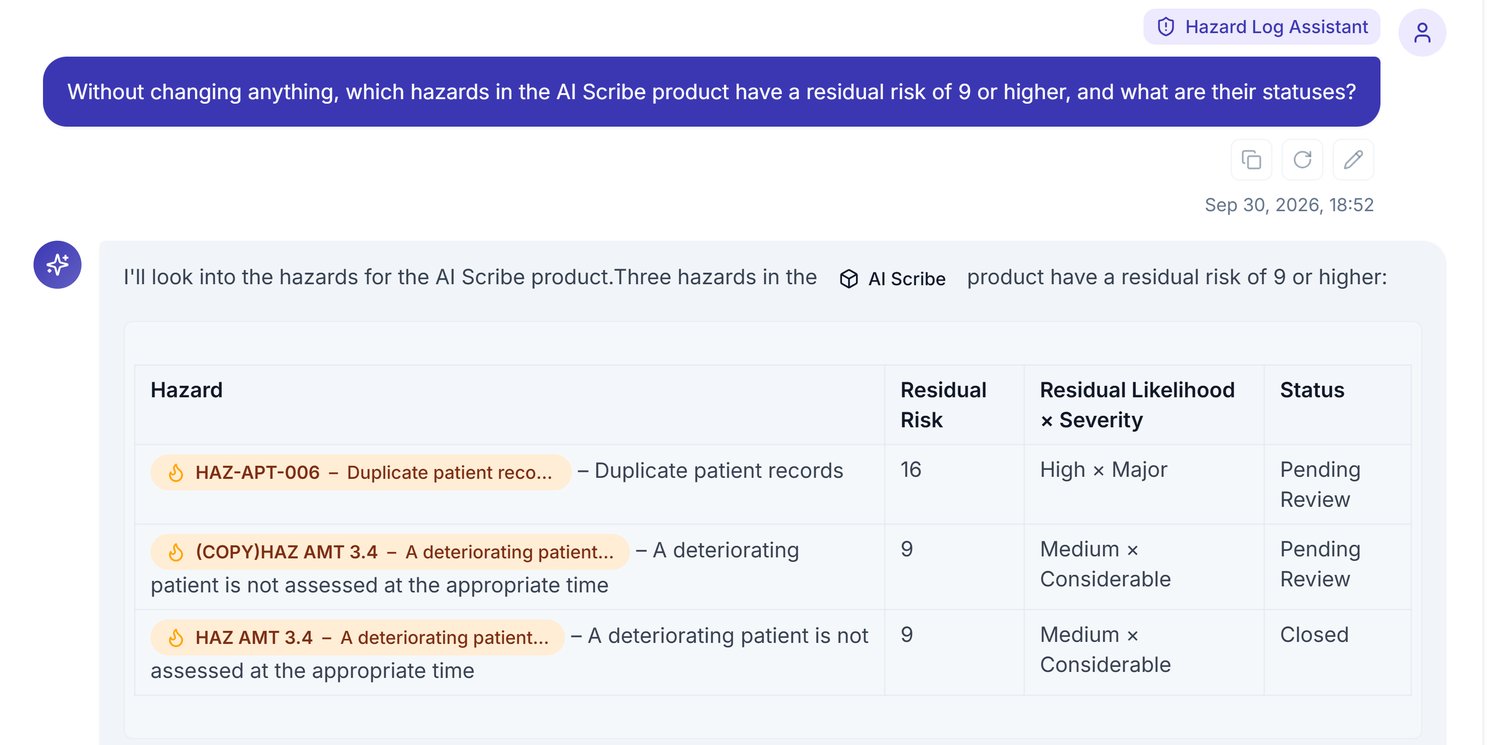
The same mode answers questions about the log; say "without changing anything" to keep it read-only. In the example below, [likelihood is multiplied by severity](/clinical-safety/risk-scales-and-thresholds#how-the-rating-is-produced), so scores run from 1 to 25.
## Ask about the log without changing it
The same mode answers questions about the log; say "without changing anything" to keep it read-only. In the example below, [likelihood is multiplied by severity](/clinical-safety/risk-scales-and-thresholds#how-the-rating-is-produced), so scores run from 1 to 25.
 ## What to do next
When the hazards are in, finish on the Hazard Log page:
* Review and score each hazard using [Risk scales and thresholds](/clinical-safety/risk-scales-and-thresholds).
* [Approve the log](/clinical-safety/hazard-log-approvals) and [publish it](/clinical-safety/sharing-and-publishing) with the **Approve** and **Publish** buttons beside the product.
## Related articles
Build a hazard by hand, with the same fields the assistant fills in.
The other modes, sources and settings.
This documentation is built and hosted on [Mintlify](https://mintlify.com), a developer documentation platform.
## What to do next
When the hazards are in, finish on the Hazard Log page:
* Review and score each hazard using [Risk scales and thresholds](/clinical-safety/risk-scales-and-thresholds).
* [Approve the log](/clinical-safety/hazard-log-approvals) and [publish it](/clinical-safety/sharing-and-publishing) with the **Approve** and **Publish** buttons beside the product.
## Related articles
Build a hazard by hand, with the same fields the assistant fills in.
The other modes, sources and settings.
This documentation is built and hosted on [Mintlify](https://mintlify.com), a developer documentation platform.